
SEO STRATEGY
Why Did My Google Rankings Drop? How to Diagnose a Sudden Traffic Loss
Six causes of a sudden traffic loss, how to tell them apart from the reporting artefacts that look identical, and what actually recovers a core update drop.
ESTIMATED READ TIME: 10 MINUTES
Would rather someone diagnosed it properly? Skip ahead and talk to our team.
A traffic drop has six realistic causes, and each one leaves a different fingerprint in Google Search Console. Before you rewrite a single page, spend an hour identifying which fingerprint you have. Businesses routinely spend months rewriting content to recover from a core update that was never the cause, while the actual problem, a technical fault or an AI answer intercepting the click, sits unaddressed.
The instinct after a bad Tuesday is to change something. That instinct is expensive. Ranking recovery is slow enough that a wrong diagnosis costs an entire quarter, and some interventions, deleting pages, mass-rewriting content, disavowing links, actively make recovery harder if the diagnosis was wrong to begin with.
This guide covers the diagnostic sequence: how to establish what actually happened and when, how to read the six patterns apart, and what genuinely works for each. It is written for business owners and marketing managers who need to make a decision this week, not for a technical SEO audience.
First: Confirm You Actually Have a Problem
A meaningful proportion of reported traffic drops are not drops at all. Rule these out before anything else.
Is it a reporting artefact?
Search Console has had genuine data bugs, periods where the Links report showed near-zero backlinks for thousands of sites, and a logging error that distorted impression data over an extended window. Both were confirmed as reporting faults rather than real losses. If your dashboard shows something implausible overnight, check whether others are reporting the same thing before you act on it.
Is it seasonality?
Compare the same period last year, not just last month. A tax preparer in May and a landscaper in December are not experiencing algorithmic problems. Year-on-year comparison in Search Console takes thirty seconds and rules out an enormous share of false alarms.
Is it a tracking change?
A tag that was removed during a website update, a consent banner change, a filter added to an analytics view, or a migration that broke the property connection will all show as a traffic cliff. If analytics dropped but Search Console clicks held steady, your traffic is fine and your measurement is broken.
The single most useful discipline
Use Search Console clicks and impressions as your source of truth, not analytics sessions. Analytics is affected by tagging, consent, and bot filtering in ways that Search Console is not. When the two disagree, Search Console is usually telling you about search and analytics is usually telling you about your own configuration.
The Six Causes and How to Tell Them Apart
Once you have confirmed the drop is real, the diagnostic question is what pattern the data shows. These six causes look different from each other in Search Console, and that difference is your diagnosis.
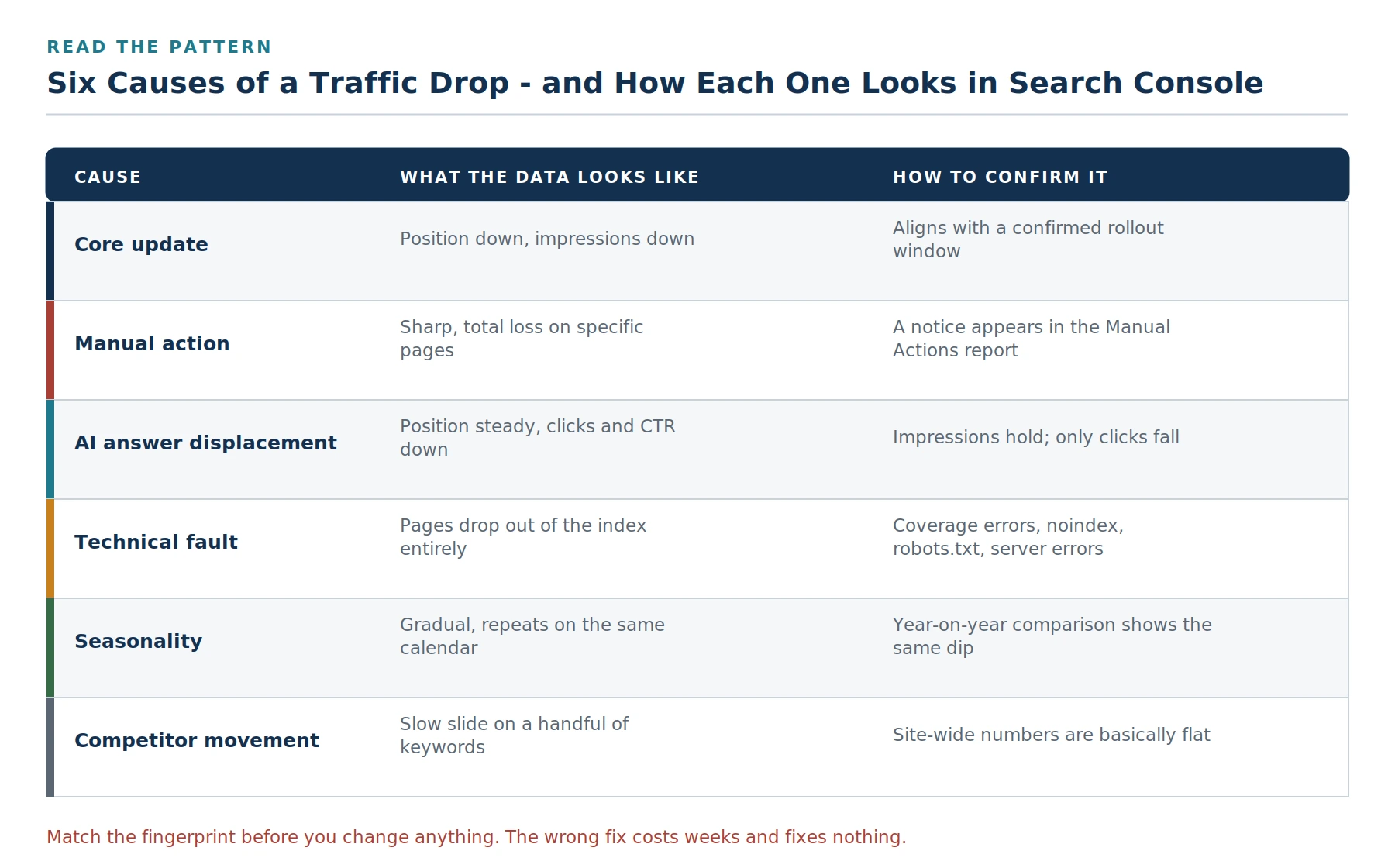
Each cause leaves a distinct signature. Match yours before you change anything.
Cause 1: A Google core update
The fingerprint: average position falls, impressions fall with it, and the timing lines up with a confirmed rollout window. The decline typically affects a category of pages rather than a random scattering.
Core updates are broad recalibrations of how Google’s ranking systems assess content quality across the entire index. Google is explicit that they are not penalties and are not targeted at individual sites. A drop means your content was re-scored relative to everyone else’s, you lost a comparison, you did not break a rule. Google’s core updates documentation states this directly and sets out the recommended analysis approach.
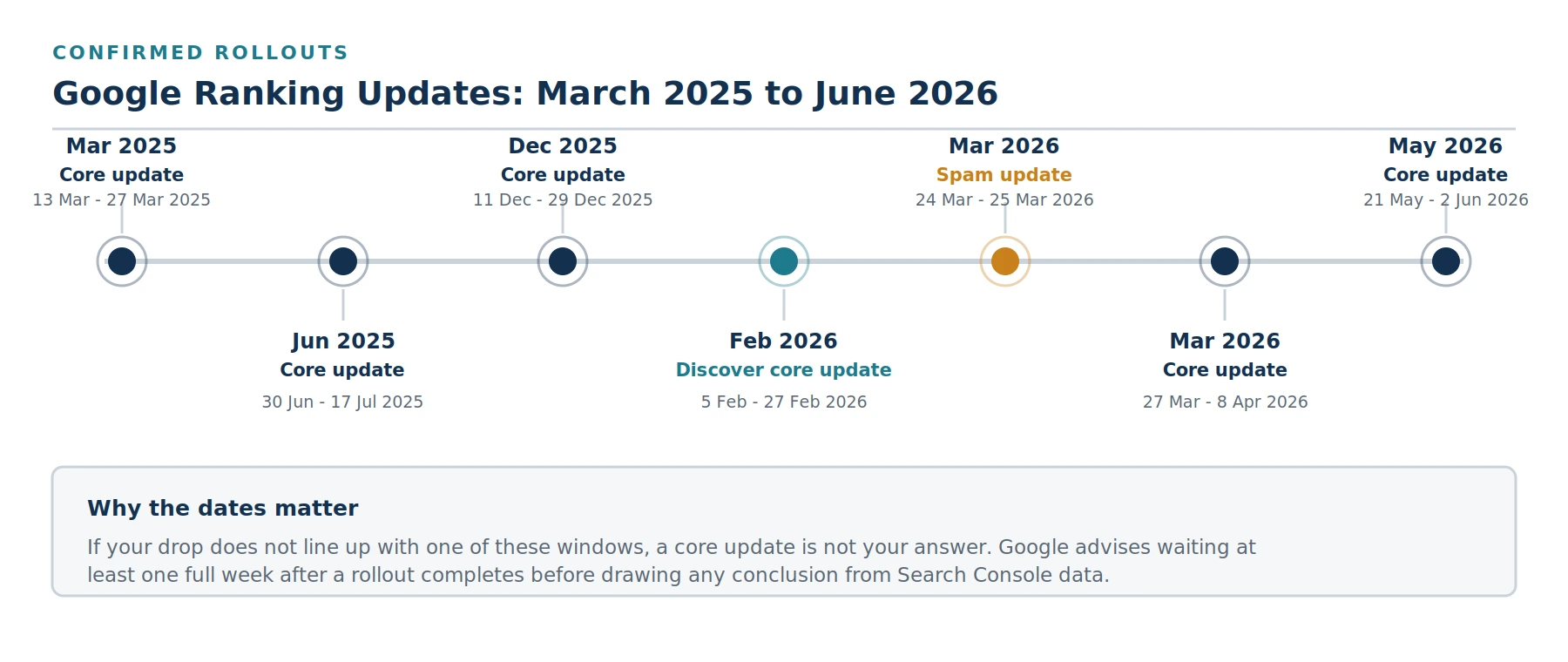
Confirmed Google ranking updates. If your drop does not align with one of these windows, look elsewhere.
How to confirm it: match your drop date against the confirmed rollout windows above. Google advises waiting at least one full week after a rollout completes before analysing your data, because rankings fluctuate heavily mid-rollout and data pulled during that period produces false conclusions. Compare a clean week before the rollout started against a clean week after it finished.
An important caveat: not every ranking movement corresponds to an announced update. Google publishes the large named updates on its Search Status Dashboard, but ranking systems are adjusted continuously between them. If your drop is modest and does not align with a named window, an unannounced adjustment is a plausible explanation, and the response is the same either way.
Cause 2: A manual action
The fingerprint: a sharp, near-total loss of visibility, often confined to specific pages or sections, with no relationship to any update window.
How to confirm it: open the Manual Actions report in Search Console. If there is a notice there, you have a manual action. If the report is clear, you do not, and no amount of general content cleanup will help, because you are treating the wrong condition.
What to do: a manual action requires you to fix the specific violation described and then submit a reconsideration request. This is a distinct process from core update recovery, and content quality work will not resolve it. Manual actions most commonly involve unnatural links, thin or scraped content, cloaking, or user-generated spam.
Cause 3: AI answers are intercepting the click
The fingerprint: this is the one that catches people out. Your average position is stable. Your impressions are stable. Your clicks and click-through rate have fallen. Nothing about your ranking has changed, something changed above your ranking.
AI-generated answers now appear across a substantial share of Google searches, resolving the query on the results page before anyone scrolls. Meanwhile, a growing share of searches never reach Google at all, because people ask an AI assistant instead. Estimates of the click-through impact vary considerably by study and by query type, informational queries lose more than commercial ones, but the direction is consistent everywhere.
Why the distinction matters more than any other on this list: rewriting your content to chase a core update will not recover traffic that an AI answer is intercepting. You still rank. Nobody is clicking. Those are different problems with different solutions, and conflating them wastes the most time of any mistake in this guide.
The response is to become the source that gets cited rather than the result that gets skipped, direct answers in the opening paragraph, clear structure, genuine data, and demonstrable expertise. We cover the mechanics in our guide to appearing in ChatGPT and Google AI answers.
Cause 4: A technical fault
The fingerprint: pages disappear from the index entirely rather than ranking lower. Impressions for affected URLs go to zero, not down.
Technical faults cause the most severe drops and are the fastest to fix once identified. They are also the most commonly missed, because the assumption after a drop is that something changed at Google rather than something changed on your site.
What to check, in order:
- Indexing report. Have pages moved from Indexed to Excluded? What reason is given?
- Accidental noindex. A staging setting carried into production, or a plugin update reverting a configuration, removes pages silently.
- robots.txt. A single line change can block an entire directory.
- Server errors. Repeated 5xx responses during crawling cause pages to drop out.
- Broken redirects after a site change. A redesign or migration that did not map old URLs to new ones loses the ranking history attached to those URLs.
- Certificate or hosting problems. An expired SSL certificate or extended downtime affects crawling and trust.
- Core Web Vitals and mobile usability. Rarely the sole cause of a cliff, but page experience issues compound across successive updates rather than resetting.
If your drop began within days of a website change, a plugin update, a hosting migration, or a redesign, start here and look no further until you have ruled it out. This is also where the underlying quality of your website build determines how often you face this category of problem at all.
Cause 5: Seasonality
The fingerprint: a gradual decline that repeats on the same calendar each year, affecting the whole site roughly evenly.
Ruled out early if you compare year on year. Worth revisiting if the year-on-year comparison shows this year’s dip is materially deeper than last year’s, that suggests a real problem sitting on top of a normal seasonal pattern, which is a different and more urgent situation.
Cause 6: Competitors improved
The fingerprint: a slow slide across a handful of keywords, while site-wide clicks and impressions stay roughly flat. No single dramatic day.
This is the least dramatic cause and the most common one nobody investigates. Rankings are relative. If a competitor published a substantially better resource, earned meaningful coverage, or rebuilt their site, you can lose position without changing anything at all.
How to confirm it: take your five worst-performing keywords and look at what now ranks above you. If the answer is a noticeably more thorough, more current, more credible page than yours, you have your diagnosis, and your brief.
The Diagnostic Sequence
Work through this in order. Each step either identifies your cause or eliminates it.
- Date the drop precisely. In Search Console, widen the date range for context, then narrow to identify the exact day clicks began falling. Precision here separates diagnosis from guesswork.
- Check the Manual Actions report. Thirty seconds, and it either changes everything or eliminates a cause.
- Compare year on year. Rules out seasonality.
- Check whether clicks fell but impressions held. If so, you are looking at AI answer displacement or a CTR issue, not a ranking loss. Stop here and address that.
- Check the Indexing report for pages that dropped out entirely. Zero impressions is a technical fault, not a ranking problem.
- Match the date against confirmed update windows. If it aligns, a core update is the likely explanation.
- Identify affected pages, not just totals. Sort by largest position decline rather than largest traffic drop. Export the worst fifty and look for the common thread, same content type, same topic cluster, same author, no author. That pattern is your diagnosis.
- Look at what replaced you. For your worst-hit keywords, examine the pages now ranking above you. This tells you what standard is now being applied.
What Actually Recovers a Core Update Drop
If your diagnosis is a core update, the honest position is that there is no switch to flip. Google’s own guidance is that a drop does not necessarily mean something is wrong with your content, and that recovery often arrives with a subsequent update rather than in the weeks between them.
That said, the patterns in what recovers and what does not are reasonably consistent.
What tends to work
- Genuine first-hand expertise. Content that demonstrates the author actually did the thing, treated the patient, built the deck, ran the campaign. Generic competent summaries of publicly available information are exactly what recent updates have devalued. This is the practical core of what E-E-A-T means in practice.
- Consolidation. Merging thin or near-duplicate pages into fewer, stronger ones. A long tail of weak pages dilutes the site’s overall quality assessment; the fix is subtraction, not addition.
- Depth over breadth. Fewer, deeply researched pieces on a narrow topic have consistently outperformed high-volume content produced to cover every keyword variant.
- Currency. Pages containing outdated figures, superseded guidance, or references to processes that have changed lose ground steadily and lose it fast during an update.
- Clear authorship and credentials. Who wrote this, what qualifies them, and can that be verified independently.
- Fixing accumulated technical debt. Page experience issues compound over successive updates rather than resetting with each one.
What does not work
- Deleting pages as a first move. A dropped page usually lost a temporary comparison, not a permanent one. Deletion is a last resort, applied to genuinely valueless pages, not a recovery tactic.
- Republishing with a new date. Changing the date without changing the substance is transparent and achieves nothing.
- Chasing a single fix for a multi-factor drop. Most significant declines have several contributing causes. One intervention rarely reverses them.
- Reacting mid-rollout. Data pulled while an update is still rolling out is noise. Changes made in response to noise are worse than no changes.
- Disavowing links reflexively. Unless you have a manual action for unnatural links, this is far more likely to harm than help.
How long recovery takes
Set the expectation honestly, whether you are the business owner or the person reporting to one.
- Technical fixes: days to a few weeks, once the pages are re-crawled. This is the fastest category by a wide margin.
- Content quality improvements: generally recognised across a subsequent core update cycle rather than immediately. Early positive signals may appear in Search Console as improved pages are re-crawled, but the full re-assessment tends to land with the next update.
- Competitive losses: as long as it takes to produce something genuinely better than what displaced you.
Some sites recover fully in one cycle. Others take two or more. Anyone promising a specific recovery date is selling certainty that does not exist.
A Note for Local Businesses
If you are a local service business, your organic rankings are only half the picture, and often not the half generating your calls.
Check your Business Profile insights alongside Search Console. A drop in calls with stable organic traffic frequently points to a Map Pack problem rather than a website problem, a profile suspension, a duplicate listing, a competitor whose review count overtook yours, or a category change. These are diagnosed and fixed completely differently from an organic ranking drop.
Our companion guides on why a business stops appearing on Google Maps and what to do about a suspended Business Profile cover that side of the diagnosis.
Or Have Us Diagnose the Drop Properly
Separating a core update from a technical fault, a tracking change, or a competitor who simply got better takes access to the data and the pattern recognition to read it. That is what our SEO programme does every month. Get in touch and we will tell you what actually happened.
Frequently Asked Questions
Q1. How long after a Google core update should I wait before making changes?
Wait until the rollout has officially completed, then wait at least one further full week before analysing your data. Google recommends this explicitly. Rankings fluctuate substantially mid-rollout as different result sets are tested, and decisions made on mid-rollout data are usually wrong. Compare a clean week before the update started against a clean week after it finished.
Q2. Is a ranking drop the same as a Google penalty?
No, and the distinction matters. A core update is a broad recalibration applied across the whole index, you lost a comparison against other pages, you did not violate a rule. A penalty is a manual action, which appears as a notice in Search Console’s Manual Actions report and requires a reconsideration request to resolve. If that report is clear, you do not have a penalty.
Q3. My rankings are the same but my traffic dropped. What happened?
That pattern, stable position, stable impressions, falling clicks, almost always means something is answering the query above your result. AI-generated answers on the results page resolve many queries before anyone scrolls, and a growing share of searches now happen inside AI assistants rather than in a search engine. The fix is to become the source those systems cite, not to rewrite your content for rankings you have not actually lost.
Q4. Can a website redesign cause a ranking drop?
Frequently, and it is one of the most common self-inflicted causes. The usual culprits are old URLs that were not redirected to their new equivalents, content that was shortened during the redesign, an accidental noindex carried over from staging, or a new site that loads more slowly than the old one. If your drop began within days of a launch, investigate the migration before anything else.
Q5. How do I know if a competitor outranked me or if I was hit by an update?
Look at the scope. A core update tends to affect a category of pages at once and lines up with a confirmed rollout window. Competitive loss shows as a slow slide on specific keywords while your site-wide numbers stay roughly flat. Check what now ranks above you for the affected terms, if it is a clearly stronger page than yours, that is your answer.
Q6. Should I delete pages that lost rankings?
Rarely, and not as a first move. A page that lost position usually lost a temporary quality comparison, not a permanent one. Deletion makes sense only for pages that genuinely serve no purpose. The more productive move is consolidation: merging several thin pages on the same topic into one substantially better page.
Q7. Does publishing more content help recover from a core update?
Usually not, and it often makes things worse. Recent updates have consistently rewarded fewer, deeper, more expert pages over high volumes of adequate ones. Adding more average content to a site that dropped for quality reasons reinforces the pattern that caused the drop. Improving and consolidating what exists is the better investment.
Q8. Why did only some of my pages drop?
That is normal and it is diagnostically useful. Export your worst-affected pages and look for the common thread: the same content type, the same topic cluster, the same author, or no author at all. Whatever those pages share is what was re-assessed. Pages that held their position tell you what the site is doing right.
Q9. Can Google Search Console data itself be wrong?
It has been, on occasion. There have been confirmed bugs affecting the Links report and impression logging. If your dashboard shows something implausible overnight, backlinks vanishing entirely, for instance, check whether the issue is being reported widely before you act on it. Clicks are generally the most reliable metric during periods of instability.
Q10. Do I need an agency to diagnose a ranking drop?
The diagnosis in this guide is something most marketing managers can complete themselves in an afternoon, and doing so is worthwhile regardless. Outside help earns its cost when the diagnosis points to something structural, a technical debt problem across a large site, a content library that needs consolidating, or a competitive position that requires sustained work to recover.