
REPUTATION MANAGEMENT
Can You Remove a Google Review? What Actually Works (and What Does Not)
The honest guide: which reviews Google removes, the exact reporting process, and the recovery playbook for everything else.
ESTIMATED READ TIME: 9 MINUTES
Dealing with a review problem right now? Skip ahead and talk to our team.
Here is the honest answer most articles bury: you cannot directly delete a Google review that someone else wrote about your business, no button in your dashboard does that, and no amount of frustration changes it. Only two parties can take a review down: the person who wrote it, and Google itself. That is the bad news. The good news is that both of those doors can be opened, and there is a specific, repeatable process for each one.
We manage online reputations for local businesses every single day at Subsilio Consulting, and review removal requests are one of the most common things clients bring to us, usually after a fake, malicious, or wildly unfair review lands on their profile. Some of those reviews come down. Many do not. The difference is almost never luck. It is whether the review actually violates Google’s content policies, and whether the report is built on evidence instead of emotion.
This guide covers everything: exactly which reviews Google removes, the step-by-step reporting and appeal process, how to get a reviewer to delete their own review, when the legal route makes sense, the tactics that waste your time (or get you penalized), and what to do when a review simply is not coming down.
The short answer
- Google removes reviews only when they violate a published content policy: fake engagement, spam, conflicts of interest, harassment, off-topic rants, and similar categories.
- A genuine negative opinion from a real customer will not be removed, no matter how unfair it feels.
- You report violations through Google’s Reviews Management Tool, and you get exactly one appeal per review if the first report is rejected.
- The reviewer can edit or delete their own review at any time, which is why resolving the underlying problem is often the fastest removal method that exists.
Who Can Actually Remove a Google Review?
Every legitimate removal path runs through one of three parties. Understanding this up front will save you hours of chasing tactics that were never going to work.
Anyone who posts a Google review can edit or delete it themselves, at any time, from their own Google account. Businesses persuade reviewers to do this by fixing the problem, not by paying, pressuring, or threatening them (more on why that matters later).
Google’s moderation systems, a combination of automated detection and human reviewers, remove content that violates its prohibited and restricted content policies. You trigger this by reporting the review and, if needed, appealing.
If a review is genuinely defamatory, a court order can compel removal through Google’s legal removal process. This is the slowest and most expensive path, and it is reserved for serious cases.
That is the complete list. Your Google Business Profile dashboard lets you report a review and respond to it; it does not let you delete it. And no, deleting or unclaiming your Business Profile does not work either: reviews are attached to the place, not to your account, so they stay visible on Maps and Search even if you walk away from the profile.
What Google Will Remove: The Policy Violations That Count
Google only takes down reviews that breach its prohibited and restricted content policies. When you report a review, you are not arguing that it is wrong or unfair, you are identifying the specific policy it violates. These are the categories that matter most for businesses:
| Violation category | What it looks like in practice |
|---|---|
| Fake engagement / spam | Reviews from bots or fake accounts, duplicate reviews posted from multiple accounts, reviews describing a visit or service that never happened, or accounts that blast identical reviews at many businesses. |
| Conflict of interest | Reviews posted by competitors, current or former employees, or anyone with a personal or professional stake. Also covers reviews posted in exchange for payment or incentives. |
| Off-topic content | Political rants, commentary about a news story involving your industry, complaints about a different business, or anything unrelated to a genuine customer experience at your location. |
| Harassment and hate speech | Threats, bullying, slurs, or content attacking people based on protected characteristics. Reviews that name and target an individual staff member abusively often fall here. |
| Personal information | Reviews exposing someone’s phone number, home address, medical details, or other private data (sometimes called doxxing). |
| Profanity and explicit content | Obscene, sexually explicit, or gratuitously offensive language. |
| Impersonation and misinformation | Reviews posted under a false identity, or deliberately deceptive claims designed to mislead, not merely claims you disagree with. |
| Illegal or restricted content | Content promoting illegal activity, or content about regulated products that breaks Google’s restricted-content rules. |
One nuance worth knowing: Google has tightened these policies significantly in recent updates. Soliciting reviews on-premises (review kiosks, handing customers a tablet at checkout), asking customers to mention specific staff members by name, and review gating are all now explicitly against policy, and Google’s automated enforcement actively removes reviews connected to those tactics. If your own reviews have been disappearing, your collection process is the first place to look.
What Google Will Not Remove (No Matter How You Phrase the Report)
This is where most businesses waste their energy. Google is deliberate about protecting genuine consumer opinion, so none of the following qualifies for removal:
Frustrating, but ratings without commentary are allowed.
“They kept me waiting 45 minutes” when you believe it was 20 is a dispute of facts, not a policy violation.
Even if the customer was difficult, rude, or partly at fault, their account of a real interaction stays up.
Fixing the issue does not remove the review; only the reviewer can do that once they are satisfied.
These are core, legitimate review topics.
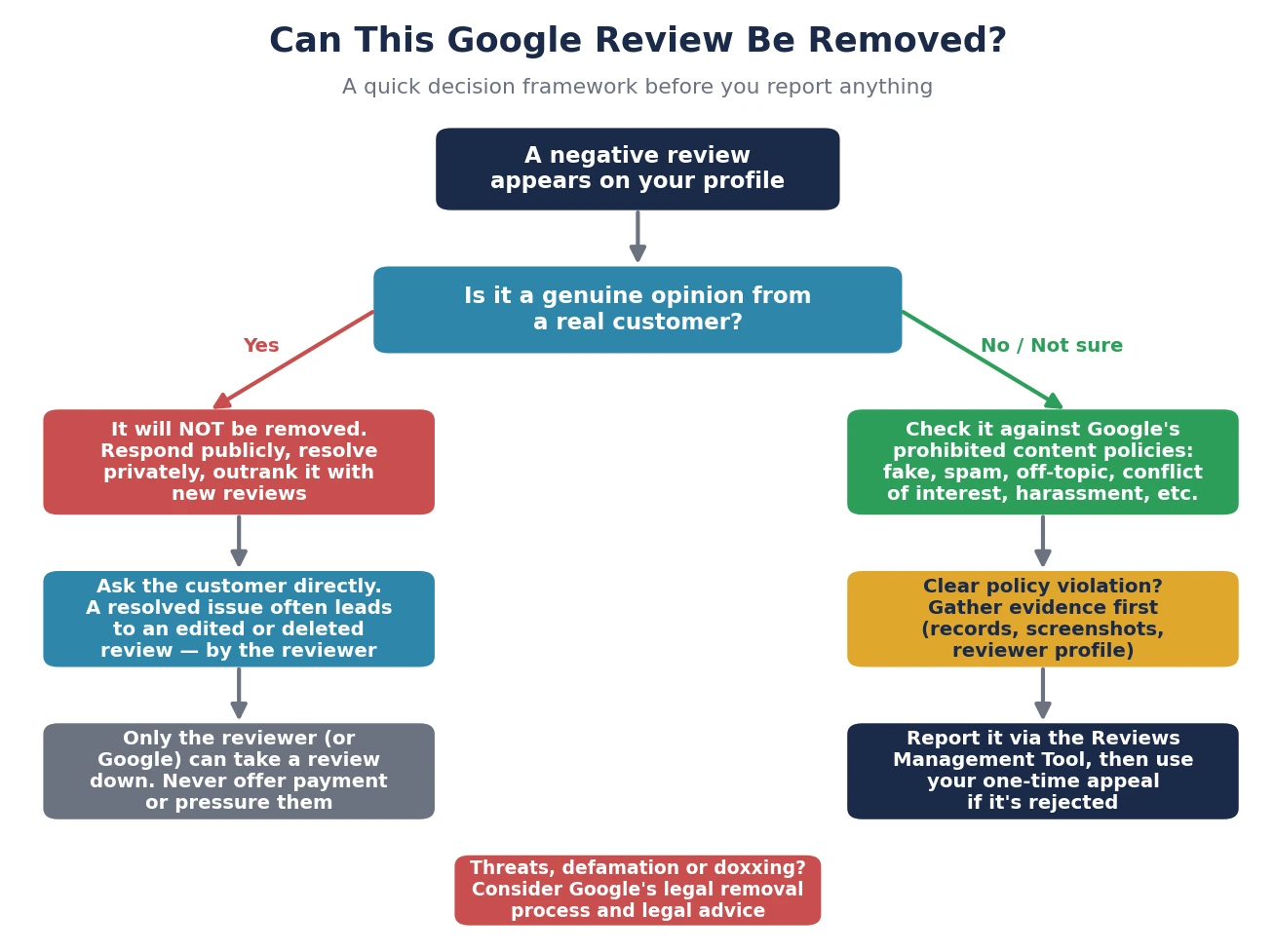
The practical test we use with clients: could a neutral stranger read this review and see a real customer describing a real experience? If yes, the removal route is closed, and your energy belongs in the response-and-recovery playbook covered at the end of this guide. If not, you have a case worth building.
Use this framework before you report anything. It determines where your time is best spent.
How to Report a Google Review for Removal (Step by Step)
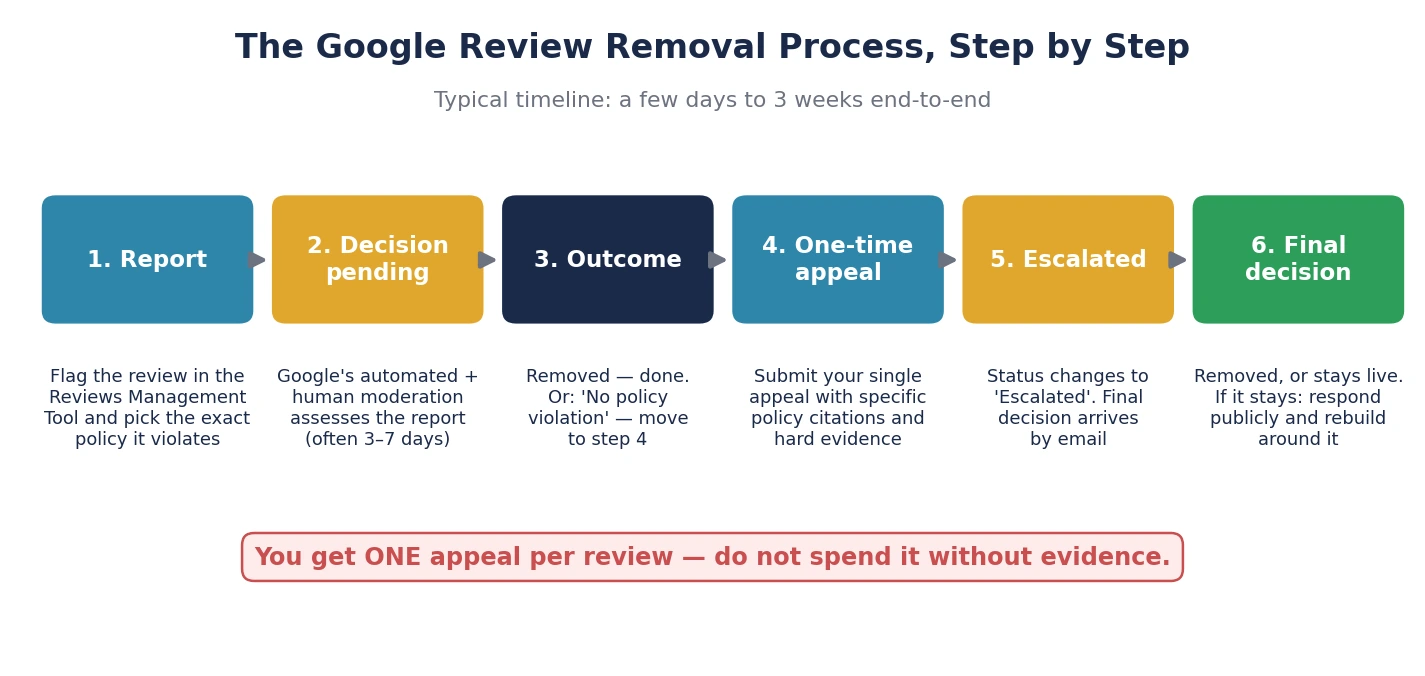
There are quick ways to flag a review from Maps or Search, but for business owners the correct starting point is Google’s Reviews Management Tool; it is the only route that lets you track the status of your report and file an appeal later. Here is the exact process:
Before touching the tool, collect anything that proves the violation: customer records showing the reviewer never transacted with you, screenshots of the reviewer’s profile and review history, proof of a competitor or ex-employee connection, or timestamps showing a suspicious review burst. Evidence is what separates successful reports from rejected ones.
Sign in with the email that manages your Google Business Profile, confirm the account, and select your business.
Find the review in the list and click Report next to it.
Do not default to spam as a catch-all. A review containing a threat is stronger reported as harassment; a competitor’s review is a conflict of interest. Google’s moderators evaluate against the category you choose, so precision materially improves your odds.
Return to the same tool anytime to check progress. Initial decisions typically arrive within about three days to a week, though complex cases take longer.
The three statuses you will see (and what each means)
Your report is in the queue and has not been evaluated yet. Be patient; re-reporting from other accounts does not speed it up and can hurt you.
Google assessed the review and declined to remove it. This is not the end: you are now eligible for a one-time appeal.
Your appeal has been passed to Google’s internal team, and the final decision will arrive by email.
The one-time appeal: your single best shot
If your report is rejected, the Reviews Management Tool lets you submit a one-time appeal, and “one-time” is literal, so do not spend it on a thin argument. From the tool, select the option to check the status of previously reported reviews, then choose “Appeal eligible reviews.” You can select up to ten rejected reviews in a single batch, fill out the appeal form, and submit.
The appeal form is where evidence wins cases. “This review is fake” is weak. “This reviewer does not appear anywhere in our booking system or payment records; their profile was created days before posting and has reviewed no other businesses; the review describes a service we do not offer” is strong. Cite the exact policy, state the facts, and skip the emotion. Moderators are checking whether a specific rule was broken, not who was wronged. Appeals typically resolve within several days to two weeks, and the final decision comes by email.
The full report-to-decision cycle usually runs from a few days to about three weeks.
Tired of playing defense with your reviews?
Talk to us. We will take a straightforward look at your review profile and tell you exactly what we would do with it.
The Overlooked Path: Getting the Reviewer to Remove It Themselves
Here is a truth that surprises many business owners: the most reliable review removal method has nothing to do with Google’s moderation team. Google’s own guidance is clear that reviewers can edit or delete their reviews at any time, and a customer whose problem gets genuinely fixed will often do exactly that, or replace a one-star rant with an updated, far kinder review. In our experience running reputation marketing programs, a well-handled recovery converts a meaningful share of negative reviewers into updated or deleted reviews, and it is the only path that also wins the customer back.
How to run the recovery conversation
Acknowledge the experience, apologize for the frustration without conceding disputed facts, and invite them to a direct conversation. This response is read by every future customer, so write it for them as much as for the reviewer.
A refund, a redo, a genuine explanation, whatever honest resolution fits. Customers can tell the difference between damage control and actual care.
Something like: “I am glad we could make this right. If you feel your review no longer reflects your experience, we would be grateful if you would consider updating it, but there is absolutely no obligation.” Then stop. One ask, ever.
If the reviewer agrees but does not know how, the steps on their end are simple: open Google Maps, tap their profile picture, go to “Your contributions,” open the Reviews tab, tap the three-dot menu next to the review, and choose Edit or Delete. On desktop, the same options live under “Your contributions” in the Maps menu.
The bright red line: never offer money, discounts, free products, or any incentive in exchange for editing or deleting a review. This directly violates Google’s policies and, in the US, the FTC’s Rule on Consumer Reviews and Testimonials, which carries civil penalties that can reach tens of thousands of dollars per violation. Fix the problem; let the review decision stay entirely theirs.
The Legal Route: When a Review Crosses Into Defamation
Most bad reviews are opinions, and opinions are protected. But a review that makes provably false statements of fact, “they stole my credit card details,” “the owner has a criminal record,” a fabricated health-code violation, may be defamatory. In those cases you have two mechanisms:
Google operates a formal legal removal process, separate from policy-based reporting, for content that is unlawful in your jurisdiction. You identify the content, the legal issue, and your relationship to it. Google’s legal team evaluates these case by case.
If a court determines the review is defamatory, Google will generally comply with a valid order to remove it. Getting there means litigation: identifying the reviewer (sometimes requiring a subpoena for anonymous accounts), proving false statements of fact, and often proving damages.
Be clear-eyed about this path. Defamation standards vary by jurisdiction, litigation is slow and expensive, and suing a customer over a borderline review can generate far more reputational damage than the review ever did; the backlash effect is real and well documented. We treat legal action as a last resort for genuinely false, materially damaging statements, always with a qualified attorney involved. This article is marketing guidance, not legal advice.
What Does Not Work (and What Can Actively Backfire)
The internet is full of confident advice on forcing Google to remove reviews. Most of it ranges from useless to dangerous. Learn from other people’s expensive mistakes:
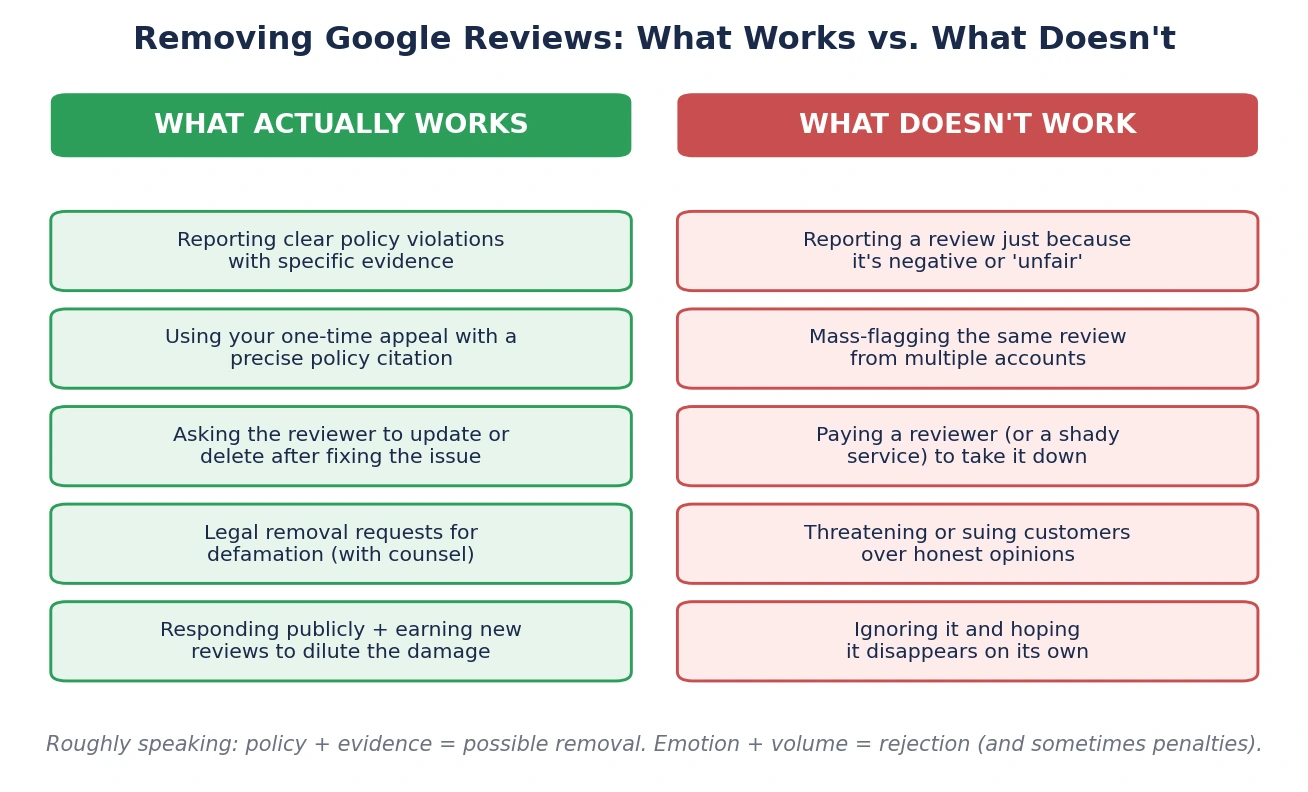
“Unfair opinion” reports are rejected almost universally. Worse, they burn your credibility and your one appeal on an unwinnable case.
Asking your staff, friends, and family to all report the same review does not add weight. Google evaluates the content, not the vote count, and coordinated flagging patterns can draw scrutiny to your profile.
Nobody outside Google can guarantee a removal, and Google cannot be paid to delete a review. Services promising otherwise either file the same reports you can file for free, use manipulative tactics that risk your profile, or simply take your money.
Buying or fabricating reviews violates Google policy and federal law, and detection has become aggressive; consequences range from mass review removal to profile restrictions and public warning labels on your listing.
Legal-sounding threats rarely produce deletions and frequently produce screenshots posted publicly, with commentary.
As covered earlier, the reviews stay. You would lose your visibility and keep the review.
Policy plus evidence gets reviews removed. Emotion plus volume gets reports rejected.
What to Do While You Wait, and If the Review Stays Up
Statistically, many reported reviews survive the process. That is not a reason to despair; it is a reason to have a plan that does not depend on removal. Three moves matter most:
A reported review can stay visible for weeks during evaluation, and potential customers are reading it right now. A calm, specific, professional response neutralizes most of the damage: acknowledge, clarify facts briefly and without arguing, state what you have done or offered, and invite direct contact. People judge a business by how it handles criticism at least as much as by the criticism itself. Our guide to managing online reviews covers the response frameworks in depth.
One negative review inside two hundred recent positives is a footnote. The same review as one of your nine total reviews is a headline. The durable fix is a consistent, policy-compliant review generation system: asking every customer, at the right moment, with a direct link. That is the core of what we build for clients through our reputation marketing service.
AI-driven search experiences increasingly summarize your reviews before customers ever read one: sentiment, recurring complaints, response quality, all condensed into a machine-written verdict. A single removed review changes that summary far less than the overall pattern of volume, recency, and your responses. We have covered how online reviews now shape your AI search results in detail, and reviews also remain a significant local ranking signal.
The Bottom Line: Fight the Right Battles
So can you remove a Google review? Sometimes, and the pattern is consistent: reviews come down when they violate a specific policy and the report proves it. Fake engagement, conflicts of interest, harassment, off-topic content: build the evidence, choose the precise category, use your one appeal wisely, and escalate to the legal route only for genuine defamation.
Everything else, the harsh-but-honest one-star, the exaggerated complaint, the customer who was having a terrible day, is a battle you win differently: with a professional response, a real resolution, and a review profile so strong that no single voice defines it. That second part is a system, not a one-off task, and if you are weighing reputation marketing against reputation management, we have broken down the difference here.
Stop Letting One Review Define Your Business
Our team builds compliant review generation, monitoring, response management, and reputation marketing systems that turn your five-star feedback into your best sales asset. Get in touch with Subsilio Consulting for a straightforward look at your review profile and what we would do with it.
Frequently Asked Questions About Removing Google Reviews
Q1. How long does it take Google to remove a review?
Initial reports through the Reviews Management Tool are typically evaluated within about three days to a week. If you appeal a rejection, expect roughly another several days to two weeks. End to end, plan for anywhere from a few days to about three weeks, and note that clear-cut violations (spam bursts, obvious bot accounts) are often removed automatically much faster.
Q2. Can I delete a Google review that someone left on my business?
No. Business owners cannot delete reviews written by others. You can report a review for violating Google’s content policies, respond to it publicly, or ask the reviewer to remove it themselves after resolving their complaint. Only the reviewer and Google can take a review down.
Q3. Can I pay to have a Google review removed?
No, and be wary of anyone claiming otherwise. Google does not accept payment for review removal, and paying a reviewer to delete a negative review violates both Google’s policies and the FTC’s consumer review rule. Third-party “guaranteed removal” services cannot do anything you cannot do yourself for free through official channels.
Q4. Will deleting my Google Business Profile remove my bad reviews?
No. Reviews are attached to your physical location on Google Maps, not to your Business Profile account. If you delete or unclaim your profile, the listing and its reviews remain publicly visible; you just lose the ability to respond to them and manage the listing. There is also no setting to turn Google reviews off.
Q5. How do I remove a fake Google review from a competitor or ex-employee?
Report it under the conflict of interest category through the Reviews Management Tool, and attach evidence: the reviewer’s identity and connection to the competitor, employment records for a former staff member, or screenshots of their review history targeting your business. Documented conflict-of-interest reports are among the most successful removal categories.
Q6. What if the reviewer was never actually a customer?
Report it as fake engagement, and support the claim with your records: no matching booking, invoice, order, or contact in your systems, plus any red flags on the reviewer’s profile (brand-new account, no other activity, or reviews scattered across unrelated cities). “Not in our customer database for the stated period” is one of the strongest evidence lines you can put in a report or appeal.
Q7. Can I sue someone over a bad Google review?
You can sue over a review that makes provably false statements of fact, but you generally cannot win over an opinion, however harsh. Defamation cases are slow, costly, jurisdiction-dependent, and carry real reputational risk if they look like retaliation against a genuine customer. Consult an attorney before going anywhere near this route.
Q8. Why did some of my Google reviews disappear on their own?
Google’s automated systems continuously remove reviews that trip policy filters, including legitimate-looking reviews collected through non-compliant methods such as on-site kiosks, incentives, or review gating. Reviews also vanish when the reviewer deletes their account or the review, or occasionally due to platform bugs. If losses are widespread, audit your collection process against Google’s current policies before assuming a glitch.