
LOCAL SEO
Google Business Profile Suspended? How to Get Reinstated, Step by Step
Which suspension you have, what triggered it, the documents that carry weight, and the appeal that gets approved, in the order that gets you back fastest.
ESTIMATED READ TIME: 12 MINUTES
Suspended right now and want it handled for you? Skip ahead and talk to our team.
If your Google Business Profile has been suspended, the short answer is this: it is almost always recoverable, and the order in which you act decides how fast. Fix the violation first, gather proof of your business’s legitimacy second, and file a single, clear appeal third. Appealing before you fix the underlying problem is the most common reason reinstatement requests get denied.
The experience is genuinely alarming. One morning the phone stops ringing. You search your own business name and there is nothing there, or the listing is visible but your dashboard shows a red banner and every button is greyed out. Google rarely tells you plainly what went wrong, which turns a simple compliance issue into a guessing game.
It helps to understand what a suspension actually is. Google operates automated detection systems across a Maps ecosystem containing hundreds of millions of listings, and it applies a lower tolerance in categories that have historically attracted fake listings, contractors, locksmiths, movers, roofers, plumbers, and other home services. A suspension is not an accusation of fraud. It is a filter being cautious, and filters catch legitimate businesses regularly. Roughly 13 million fake Business Profiles were removed by Google during 2025 alone; a system operating at that scale will inevitably produce false positives.
This guide covers the full process: how to identify which type of suspension you have, the specific triggers that cause each one, what documentation actually works, how to write an appeal that gets approved, what to do when it is denied, and how to stop it happening again.
The one thing not to do
Do not create a new Business Profile for the same location. It will not restore your visibility, it will create a duplicate listing that competes with the suspended one, and it makes the eventual reinstatement considerably harder. Your reviews and history are attached to the original profile, abandoning it means abandoning them.
| :—- |
Step 1: Identify Which Type of Suspension You Have
There are three states, and the fix differs for each. Getting this wrong means solving the wrong problem for a week while your leads go elsewhere.
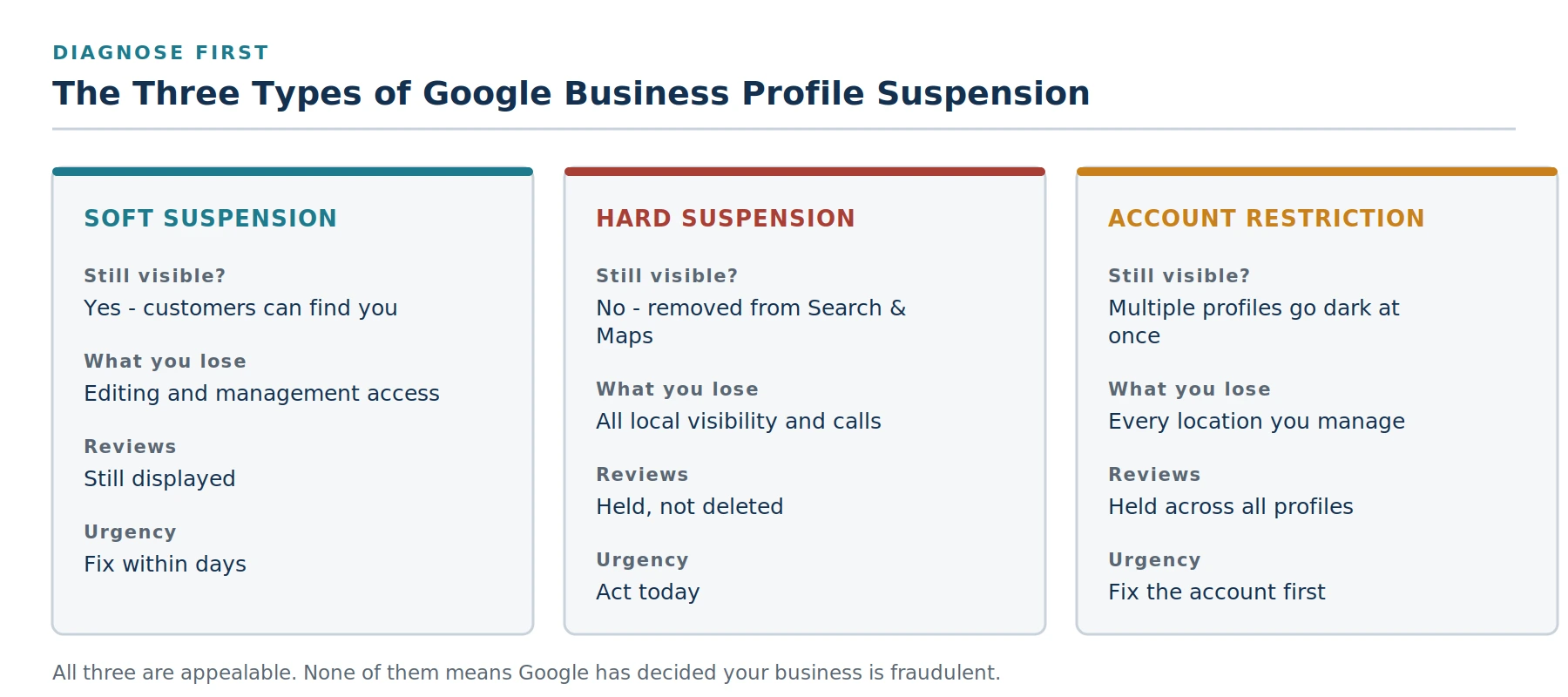
The three suspension states, and what each one costs you.
Soft suspension
Your profile stays live on Search and Maps. Customers can still find you, call you, and get directions. What you have lost is management access, you cannot edit information or respond to reviews until the profile is reinstated. You will usually see a suspension notice in your dashboard.
Why it matters: a soft suspension is not costing you revenue today, but it locks you out of the profile at exactly the moment you most need to correct it. It also frequently precedes a harder action if the underlying issue is not resolved.
Hard suspension
Your profile has been removed from Search and Maps entirely. Customers searching your business name find nothing. This is the version that costs money by the hour, particularly for service businesses where the Map Pack is the main source of inbound calls.
Important reassurance: your reviews are held, not deleted. The listing still exists in your dashboard. When the profile is reinstated, review history typically returns with it.
Account-level restriction
This is broader than any single listing. Google has flagged the Google account or business group that manages the profiles, so every location under that account can go dark simultaneously, including locations that never broke a rule. If you manage several profiles and they all disappeared on the same day, you are almost certainly looking at an account restriction rather than a listing problem.
The order matters here: you must resolve the account restriction before individual profile appeals will succeed. Check the status of the managing Google account at myaccount.google.com/restrictions before you file anything else.
Step 2: Find What Actually Triggered It
Google’s notification is usually generic. The real diagnostic work is comparing your profile against the guidelines and finding the mismatch. In practice, the overwhelming majority of suspensions trace back to one of the following.
1. Keywords in the business name
This is the single most common trigger. Your Business Profile name must match your real-world business name, the one on your signage, your registration, and your legal documents. “Denver’s Best Plumbing & Drain Repair” is a violation if the company is registered as “Denver Plumbing Co.” So is appending a city, a service, or a tagline that does not appear on your storefront.
The fix: strip the name back to exactly what appears on your sign and your formation documents. Note that you may omit “LLC” or “Inc” without issue, that is not what triggers this.
2. An address Google cannot verify
P.O. boxes are not permitted. Neither are virtual offices, mailbox services, or co-working spaces unless your business permanently staffs that location during your stated hours, with signage. Google checks this, and in competitive categories, so do your competitors, a virtual office address is one of the most commonly reported violations through the spam redressal process.
3. Service-area business set up as a storefront
If you travel to customers rather than serving them at your premises, a mobile locksmith, a plumber, a cleaning service, you are a service-area business. Your address must be hidden and your service areas listed instead. Displaying a home address as a storefront when customers never visit it is a guideline violation, and it is a frequent cause of suspension among trades.
A practical limit worth knowing: service areas are expected to be within a reasonable driving distance. Listing forty towns across three counties reads as an attempt to game proximity rather than a genuine coverage area.
4. Rapid or drastic edits
Changing your business name, primary category, address, and phone number in the same week looks like an account takeover to an automated system. Even routine changes can prompt an integrity check. If you have inherited a profile from a previous agency or employee, make corrections gradually and document why each one was made.
5. Duplicate listings
Two profiles for the same business at the same address split your signals and can trigger enforcement against both. Duplicates often appear when a previous marketing provider created a listing you did not know about, or when a business relocated without properly closing the old profile.
6. Ineligible business model
A Business Profile requires face-to-face contact with customers, either at your location or at theirs. Purely online businesses, lead-generation sites, and businesses that only take calls do not qualify. This catches a surprising number of consultancies and agencies.
7. Inconsistent information across the web
Google corroborates your profile against your website, directory listings, and social profiles. If your Business Profile says one address and your website footer, your industry directory listing, and your Facebook page each say something different, that inconsistency reads as an unverifiable business. This is exactly the kind of foundational work that a properly structured local SEO programme should have handled before a suspension ever became a possibility.
8. Review manipulation
This trigger has expanded significantly. In April 2026 Google added new clauses to its Maps rating manipulation policy that made two long-standing habits explicit violations: directing staff to solicit a specific number of reviews (quotas, contests, per-technician targets), and directing staff to request reviews containing specific content, such as naming an individual employee. Many businesses ran programmes like these for years in good faith. They are now enforceable violations, and enforcement escalates from review removal to a public warning banner on your profile to suspension.
If any part of your review process involves incentives, quotas, or scripts, read our full breakdown of what the FTC’s fake review rule and Google’s policy actually prohibit before you file an appeal, a suspension caused by review practices will not clear until the practice itself stops.
9. High-scrutiny categories
Locksmiths, garage door services, addiction treatment providers, and certain other categories face additional verification because those verticals have been heavily targeted by fake listings. Businesses in these categories may be asked for extra verification even after a successful reinstatement. That is normal, not a sign your appeal failed.
Step 3: Fix the Violation Before You Appeal
This is the step people skip, and skipping it is why appeals get denied.
Reinstatement is an appeal, not a resubmission. You are asking a reviewer to confirm that your profile now complies with the guidelines. If the violation is still visible on the profile when they look, there is nothing to approve. Worse, repeated denials make each subsequent appeal harder to win because the case history works against you.
Before you touch the appeal form:
- Correct the business name to match your signage and legal documents exactly.
- Set the address correctly, a real staffed location, or hidden with service areas listed if you travel to customers.
- Choose the single most accurate primary category and stop switching it.
- Make your website, major directory listings, and social profiles agree with the profile on name, address, and phone.
- Find and resolve any duplicate listings for the same location.
- If a call-tracking number is in use, add your main published local number as an additional phone number so Google can still connect the listing to the number that appears across the web.
Take screenshots first
Before you make any changes, screenshot the current state of the name, address, categories, hours, service area, and phone fields. If the appeal goes several rounds, you will need to show precisely what changed and when. It also protects you if an edit is later attributed to you incorrectly.
| :—- |
Step 4: Gather Documentation That Actually Works
Google’s reinstatement reviewers are looking for evidence that a real business operates under this name at this location. Some documents carry weight; others do not.
Strong evidence
- EIN letter from the IRS
- Articles of Incorporation or state formation documents
- Business licence or tax certificate
- Lease agreement or a recent utility bill at the address
- Proof of insurance
- A recent business bank statement
- Clear photographs of permanent exterior signage, one from street-view distance showing the sign in context, one close up
- Interior photographs showing branding, and for service-area businesses, photographs of permanently branded vehicles
Weak evidence
Invoices alone are not sufficient. Neither are business cards, screenshots of your own website, or a magnetic vehicle sign that could have been applied that morning. If you are a sole proprietor without formation documents, substitute bank statements, tax filings, or other official paperwork that ties you personally to the business name and address.
You can also strengthen the appeal with links rather than attachments: your website, your listings on major directories, professional association memberships, and any legitimate press coverage. These help a reviewer corroborate that your business exists consistently across the web rather than only on Google.
A practical note on file limits: if you have more than four documents, package them into a single ZIP file, or place them in a cloud folder and include a shareable link set so that anyone with the link can view them.
Step 5: Submit One Clean Appeal
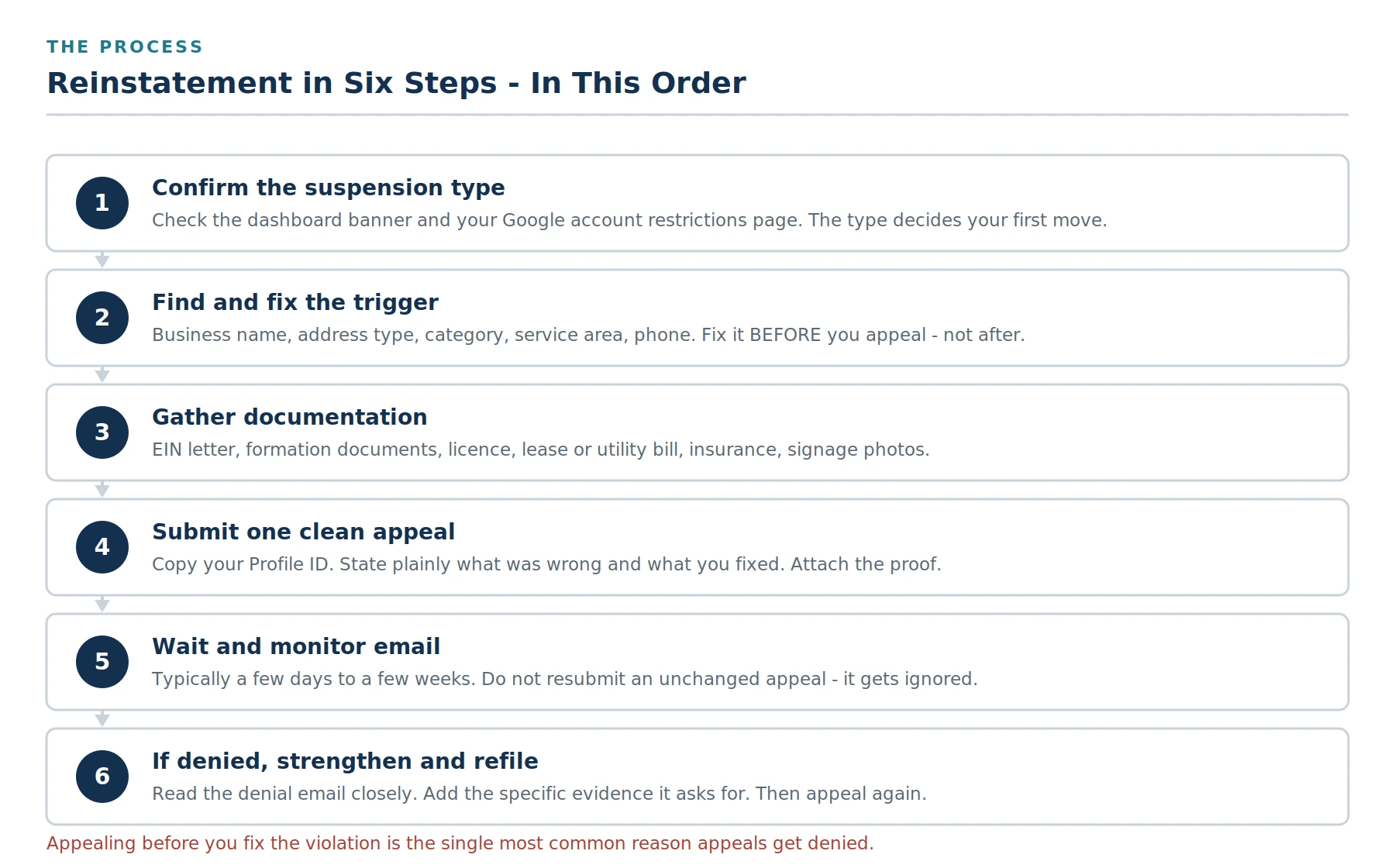
The reinstatement sequence. Each step depends on the one before it.
Sign in to the Google account that manages the profile, open the suspended location, and use the Business Profile reinstatement form. You will need your Profile ID: search your business while signed in, open the profile, then go to the three-dot menu, Business profile settings, Advanced settings, where the Profile ID is displayed.
What to write
Short and factual outperforms long and emotional. The reviewer is checking compliance, not reading an appeal for sympathy. State what was wrong, what you changed, and what evidence you have attached.
Appeal template you can adapt
Business name: (exact legal / signage name) Profile ID: (your ID) Category: (primary category) Our Business Profile was suspended on (date). We have reviewed the Business Profile guidelines and corrected the following: 1. Removed marketing keywords from the business name. The profile now reads exactly as our signage and Articles of Incorporation. 2. Updated our service-area settings to hide the address, as we serve customers at their locations rather than at our premises. 3. Corrected our address on our website and major directory listings so all sources now match. Attached: EIN letter, Articles of Incorporation, business licence, lease agreement, proof of insurance, and photographs of our permanent exterior signage and branded vehicles. Our website is (URL) and our listings on (directory) and (directory) confirm the same name, address and phone number.
| :—- |
What to leave out: how much revenue you are losing, how long you have been in business without incident, criticism of the review process, and anything that reads as pressure. None of it affects the outcome, and length works against you.
Step 6: What Happens After You Submit
Response times vary considerably. Straightforward cases can resolve within a few business days. Complex cases, sensitive categories, and appeals that have already been denied once can take several weeks.
While you wait:
- Monitor the email address attached to the managing Google account, including spam. Google will often ask for additional documentation, and a slow reply extends the timeline.
- Do not submit a second appeal. Duplicate submissions do not accelerate anything and can push your case backwards.
- Do continue correcting clear violations if you find more. Fixing genuine guideline problems during review does not harm your case.
If your appeal is denied
A denial is not the end of the process, but resubmitting the same appeal is pointless. Read the denial email closely, it usually contains a signal about which requirement was not met, even if it is phrased generically.
- Re-check eligibility honestly. A co-working address without permanent staffing during your posted hours is rarely going to qualify, no matter how good the documentation is.
- Strengthen the location evidence. Add clearer signage photographs, a utility bill, a business licence tied to the address.
- Align every citation. Reviewers cross-reference. If a major directory still shows an old address or a slightly different business name, correct it and give the correction time to propagate before you refile.
- Then, and only then, appeal again with the new evidence.
If you have exhausted this and remain stuck, the Google Business Profile Help Community is staffed by volunteer Product Experts who see edge cases daily. Post the facts of your case and the list of documents you have submitted, but never upload the documents themselves, as the forum is public.
What Happens to Your Reviews and Rankings
Two questions come up constantly, and the answers are mostly reassuring.
Reviews: during a suspension your reviews are held rather than deleted, and they typically reappear within a few days of reinstatement. The exception is reviews that were themselves the cause of the problem. If your suspension stemmed from review manipulation, reviews that violate the rating manipulation policy may be permanently removed, and they will not come back.
Rankings: a reinstated profile does not always return instantly to its previous Map Pack position. Google needs to re-establish confidence in the listing, and the profile has been out of circulation. Most businesses see positions recover over the following weeks provided the rest of their local signals, reviews, citations, website relevance, remained intact throughout. A prolonged suspension does more lasting damage than a short one, which is the practical argument for treating a hard suspension as an emergency rather than an admin task.
How to Prevent This Happening Again
Profiles under active management get suspended far less often, for an unglamorous reason: the fundamentals are correct by default, and when a flag does appear it gets caught the same week rather than the month after the leads stopped.
- Keep the name field clean. Never add cities, services, or superlatives, even when a competitor appears to be getting away with it.
- Make changes deliberately. One meaningful edit at a time, with a real reason behind it.
- Audit your citations quarterly. Name, address and phone should be identical everywhere they appear.
- Review your review process against current policy. Quotas, staff-naming scripts, and incentive programmes that were normal practice two years ago are violations now.
- Restrict who has manager access. Former employees and former agencies with lingering access are a genuine account-restriction risk.
- Check the profile weekly. A soft suspension found on day two is a minor administrative fix. Found on day thirty, it has usually escalated.
Your Business Profile is also increasingly the foundation for visibility beyond Google itself. AI assistants that recommend local businesses draw heavily on the same signals, profile completeness, review volume and sentiment, and consistency across the web. A suspended profile removes you from those answers too, which is worth understanding alongside how AI search actually decides which businesses to recommend.
The Bottom Line
A suspended Business Profile feels like a verdict. It is closer to a paperwork problem with an unusually painful deadline.
The businesses that recover quickly all do the same three things. They diagnose the suspension type before acting, so they solve the right problem. They fix the actual violation before filing anything, so the reviewer has something to approve. And they submit one calm, factual, well-documented appeal rather than five urgent ones.
The businesses that stay suspended for months usually made one of two mistakes: they appealed before fixing anything, or they built a second listing and walked away from the profile carrying a decade of reviews.
The harder question is what happens after reinstatement. A suspension is almost always a symptom, of a name field that was never compliant, of citations that drifted apart over years, of a review process built before the rules changed. Getting the listing back without addressing the cause simply resets the clock until the next automated sweep.
Subsilio Consulting has worked with Denver businesses on local SEO and Google Business Profile management for over a decade, and with reputation and review programmes built to stay compliant as the rules change. If your profile is currently suspended, or if reading this list made you uneasy about your own setup, get in touch for a review of your profile, and you can see what our clients say about working with us while you are deciding.
Or Skip the Guesswork and Have Us Manage the Profile
Clean name fields, consistent citations, compliant review programmes, and a weekly eye on every profile: that is what our local SEO and Business Profile management does, so a suspension never gets a foothold. Get in touch for a straightforward look at your profile and what we would fix first.
Frequently Asked Questions About GBP Suspensions
Q1. How long does Google Business Profile reinstatement take?
Most appeals are resolved within a few business days to two weeks. Complex cases, high-scrutiny categories such as locksmiths, and appeals that have already been denied once can take several weeks. There is no way to expedite the process, and submitting duplicate appeals slows it down rather than speeding it up.
Q2. Will I lose my reviews if my profile is suspended?
No. Reviews are held during a suspension rather than deleted, and they generally reappear within a few days of reinstatement. The exception is reviews that violated Google’s rating manipulation policy, if those were the cause of the suspension, they may be permanently removed.
Q3. Can I just create a new Google Business Profile instead of appealing?
No, and doing so makes the situation worse. A new listing at the same address creates a duplicate, which is itself a guideline violation and can trigger enforcement against both profiles. You would also lose your entire review history and the ranking authority built up over years. Always appeal the existing profile.
Q4. Why was my profile suspended when I did not change anything?
Suspensions are frequently triggered by automated sweeps rather than by something you did that week. Google periodically re-evaluates listings across whole categories, and a profile that has quietly been non-compliant for years, a keyword in the name, a virtual office address, can be caught in one of those passes. A competitor reporting your listing through the spam redressal process can also trigger a manual review.
Q5. What is the difference between a suspension and a manual action?
They are separate systems. A Business Profile suspension affects your listing on Google Maps and in local results, and is appealed through the Business Profile reinstatement form. A manual action affects your website in organic search results, appears in Google Search Console, and is resolved through a reconsideration request. A suspension does not create a manual action, and vice versa.
Q6. Does a suspended Google Business Profile affect my website’s rankings?
Not directly, the two systems are separate. Indirectly, though, the impact is real. Your Business Profile contributes to your overall local authority, and a suspension removes your Map Pack visibility, your local review signals, and a significant share of the branded traffic that would otherwise reach your website.
Q7. Can I appeal more than once?
Yes, but only after a denial, and only with something new. Read the denial email carefully, correct the specific issue it points to, add stronger evidence, and then refile. Repeated identical appeals are typically ignored.
Q8. My whole account was restricted and all my locations disappeared. What do I do?
This is an account-level restriction rather than a listing problem, and the order of operations is different. Check the managing Google account’s restriction status first and resolve the account issue before appealing individual profiles. Appeals filed while the account remains restricted will not succeed.
Q9. Do photos of my storefront or vehicle actually help an appeal?
They help most when the question is whether your business physically exists where you say it does. High-quality photographs of permanent exterior signage, one wide shot showing context, one close up, carry more weight than interior shots. Magnetic or temporary vehicle signage carries little weight; permanent branding does.
Q10. Should I hire someone to handle reinstatement?
For a straightforward first suspension with obvious causes, most business owners can work through it using this guide. Professional help is worth considering when you are managing multiple locations, when the account itself has been restricted, when you have already been denied once, or when the underlying cause is something structural such as your business model’s eligibility or a review programme that needs redesigning.