
LOCAL SEO
Why Isn’t My Business Showing Up on Google Maps? 12 Reasons and Fixes
Twelve reasons a business goes missing from Google Maps, split into the ones that hide you completely and the ones that just bury you, with the fix for each.
ESTIMATED READ TIME: 11 MINUTES
Rather have someone diagnose it for you? Skip ahead and talk to our team.
Before you change a single setting, answer one question: is your business completely absent from Google Maps, or is it present but ranking below where customers will find it? These look identical from the outside and they are entirely different problems. One is a visibility failure, verification, suspension, duplicates. The other is a competitive ranking problem. Attempting to fix a ranking problem when you actually have a verification problem wastes weeks and changes nothing.
Here is the two-second test. Search your exact business name on Google Maps while signed out of your Google account. If your profile appears, you have a ranking problem, jump to reasons 7 through 12. If nothing appears, you have a visibility problem, and reasons 1 through 6 are where your answer is.
The stakes justify the diagnostic care. For most local service businesses, the Map Pack, the three-listing block that sits above the organic results, is the single largest source of inbound calls. Being absent from it does not mean fewer leads. It frequently means no leads at all from search.
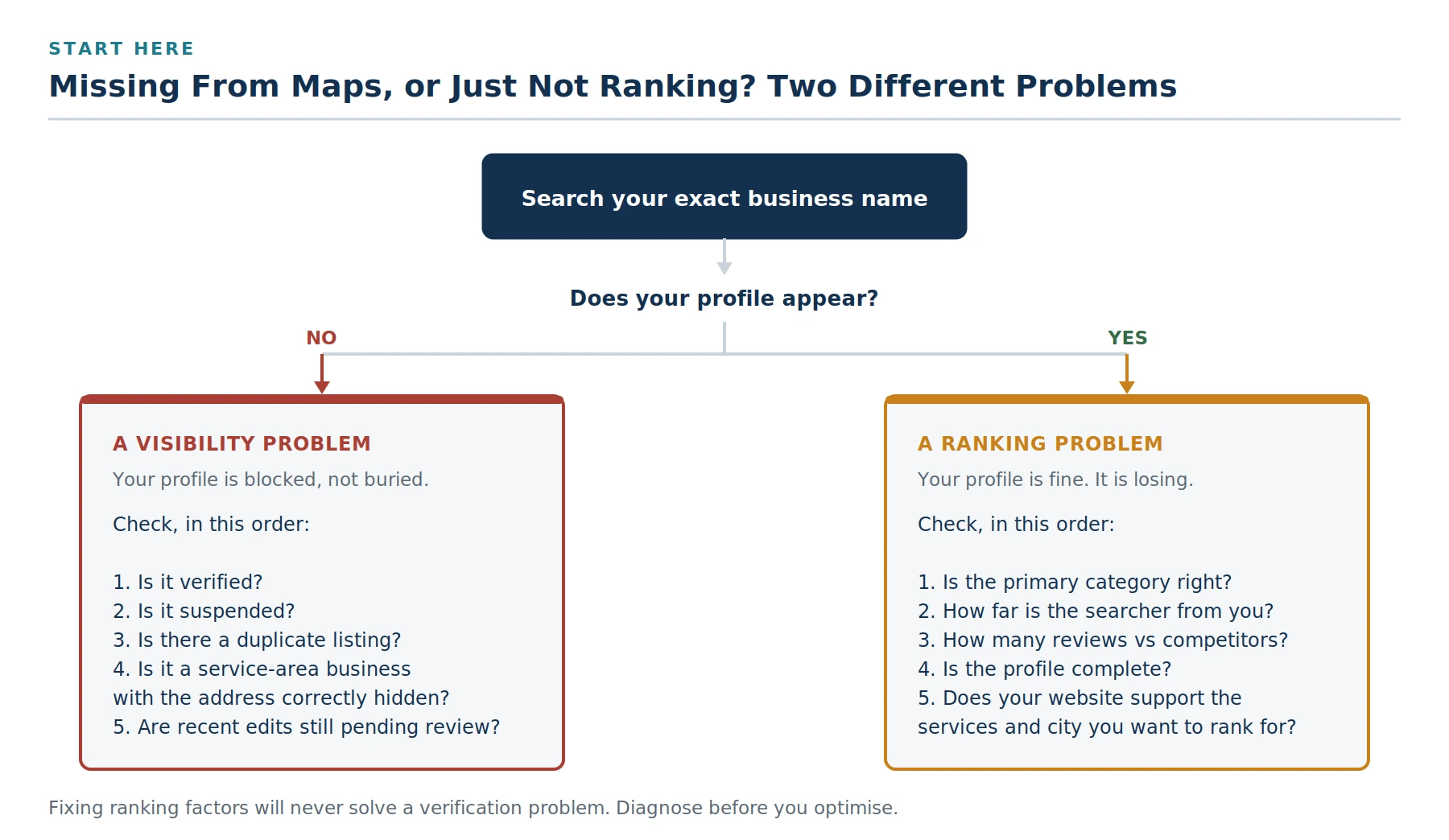
Start here. The path you take depends entirely on this first answer.
Part One: Your Profile Is Completely Missing
If your business does not appear even when someone searches your exact name, Google is not ranking you poorly, it is not showing you at all. Work through these six in order.
1. Your Business Profile was never verified
This is the most common cause and the most frequently overlooked. An unverified Business Profile generally will not appear on Maps at all. Google does not surface businesses it has not confirmed are real.
How to check: sign in at business.google.com with the email address tied to your business. If you see a “Verify now” prompt or an unverified banner, that is your answer.
The fix: complete whichever verification method Google offers you, video, phone, email, or postcard. Video verification has become the most common route and typically requires you to record a continuous walkthrough showing your signage, your location, and evidence that you operate the business. Verification can take anywhere from a few days to a couple of weeks to clear. Until the verification completes, nothing else on this list will help.
2. Your profile has been suspended
A hard suspension removes your listing from Search and Maps entirely, and Google does not always send an obvious notification. Sign in to your dashboard and look for a suspension banner.
The fix: this needs its own process, identify the suspension type, correct the guideline violation, then appeal with documentation. Do not create a replacement listing, which compounds the problem by adding a duplicate. Our step-by-step reinstatement guide covers the full sequence.
3. A duplicate listing is competing with yours
Two profiles for the same business split your signals. Google may show the wrong one, suppress both, or show a stale duplicate with an old address and no reviews. Duplicates commonly appear when a previous marketing provider created a listing you never knew about, when a business relocated without closing the old profile, or when Google auto-generated a listing from public data before you claimed yours.
How to check: search your business name, your phone number, and your address separately on Google Maps. Any listing at your location that you do not control is a duplicate.
The fix: if the duplicate is unclaimed, use the “Claim this business” option to take ownership, then request a merge through Business Profile support. If someone else has claimed it, which happens more often than you would expect after an agency relationship ends, file an ownership conflict request with documentation proving you are the legitimate owner. Suppression from duplicates can persist for weeks after the merge, so resolve it early.
4. You are a service-area business with the address set incorrectly
If you travel to your customers rather than serving them at your premises, you are a service-area business, and Google expects your address to be hidden with service areas listed instead. This causes two opposite failures.
- Address showing when it should not: displaying a home address as a storefront is a guideline violation and a frequent suspension trigger for trades.
- No storefront pin, and that is correct: a properly configured service-area business will not show a map pin at a physical address. If you were expecting one, its absence is not a fault. You will still appear in local results for your service areas.
A limit worth knowing: a service area is expected to be a realistic coverage radius. Listing every town within a hundred miles reads as an attempt to manipulate proximity, and it does not widen your reach, it can narrow it by diluting relevance.
5. Recent edits are still under review
Google reviews significant changes before publishing them. Edits to your business name, address, category, or ownership can sit pending for days. During that window, information may display inconsistently or the profile may behave unpredictably.
The fix: wait. Making further edits during a pending review restarts the process and can trip an integrity check. If a change has been pending for more than two weeks, that is worth investigating; three days is not.
6. Your listing is too new
A newly verified profile does not immediately compete. Google needs to establish confidence in the listing, and that takes time, usually a few weeks before you see meaningful placement, longer in competitive urban categories.
What actually accelerates it: completing every field on the profile, adding genuine photographs, earning your first authentic reviews, and making sure your website and directory listings corroborate the same information. What does not accelerate it: posting daily updates, adding dozens of secondary categories, or creating additional listings.
Part Two: Your Profile Exists but Nobody Finds It
If your profile appears when you search your business name but not when you search the services you provide, the problem is competitive rather than technical. Google ranks local results on three factors, and understanding which one you are failing tells you where to spend your effort.
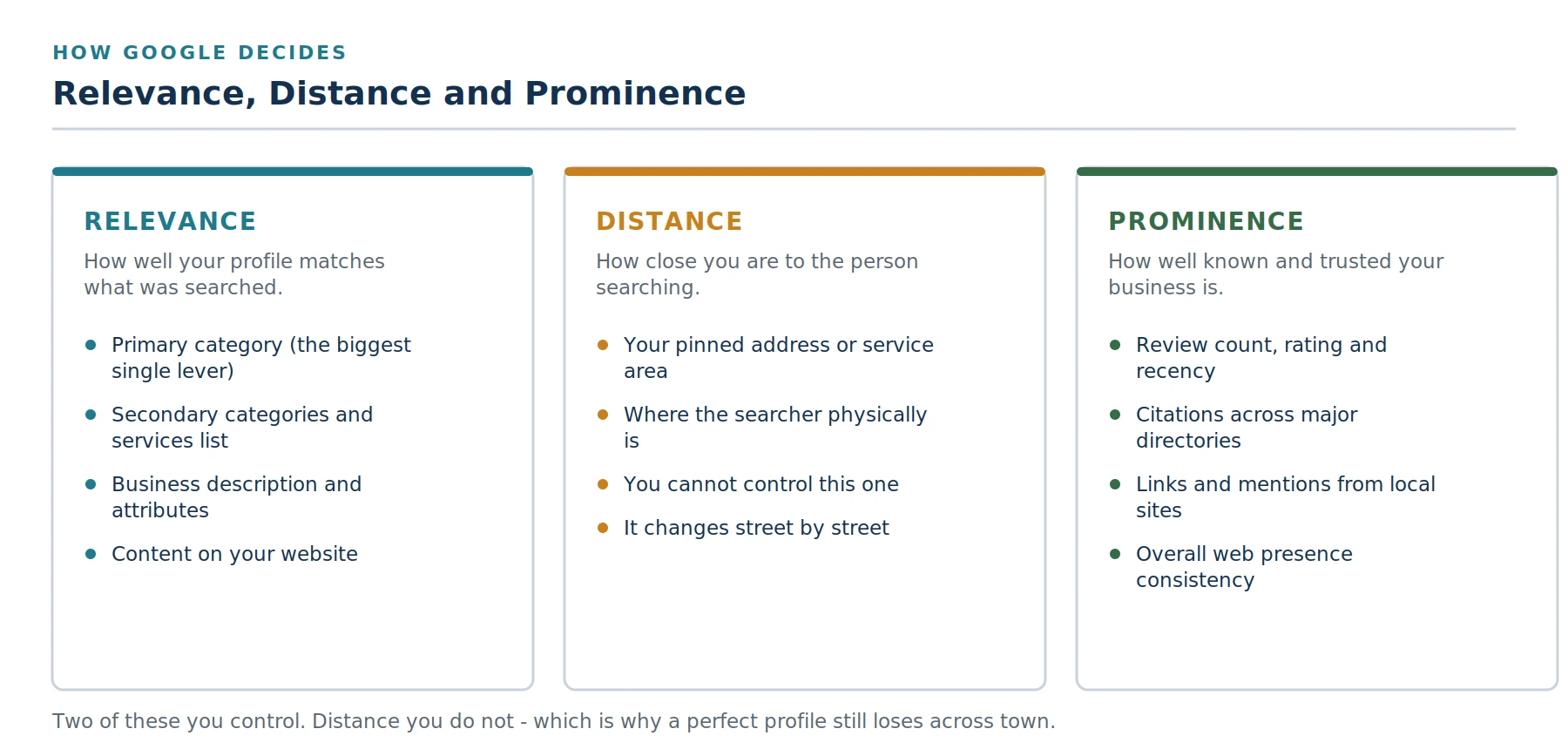
Google’s three stated local ranking factors. You control two of them.
Google states these directly in its guidance on improving local ranking: relevance, distance, and prominence. The practical insight is that distance is largely outside your control, which means relevance and prominence are where the work happens.
7. Your primary category is wrong
This is the highest-leverage single setting on your entire profile. Google leans heavily on the primary category to decide which searches you are even eligible to appear in. A plumber whose primary category is set to “Contractor” is largely invisible for “plumber near me”, not ranking poorly, but not in the running.
The fix: set the primary category to the single term that most precisely describes your core business, then add secondary categories for genuine additional services. Resist the urge to add fifteen. Excessive secondary categories dilute relevance rather than expanding it, and frequent category switching is itself a suspension trigger.
A useful test: look at which categories the businesses currently ranking in your target Map Pack are using. If every one of them uses a category you do not, that is a signal worth acting on.
8. The searcher is simply too far away
Proximity is one of Google’s three stated factors, and it operates at a granularity that surprises people. A customer three miles away may see an entirely different Map Pack than one standing outside your door. This is not a failure of your profile, it is how local search is designed to work.
How to test honestly: searching from your own office and seeing yourself at position one tells you nothing. Ask a customer in the part of town you actually want to win to search and tell you what they see. Better still, use a rank tracking tool that reports results by geographic grid so you can see where your visibility ends.
What to do about it: you cannot move closer to every searcher, so you widen your reach by strengthening the other two factors. A business with substantially stronger relevance and prominence signals will out-rank a nearer competitor across a wider radius. That is the whole game in competitive local markets.
9. You have far fewer reviews than your competitors
Reviews feed prominence directly, and prominence often decides the winner when several nearby businesses are all relevant enough. There is no universal threshold, what matters is your standing relative to the businesses currently occupying the Map Pack you want.
How to assess it: look at the three listings ranking for your target search. Note their review counts, their average ratings, and how recently they received reviews. If they each have eighty reviews and you have twelve, you have found your gap, and no amount of profile optimisation will close it on its own.
What works: a consistent, systematic process for asking every customer, not a burst of activity. Steady accumulation reads as authentic; forty reviews appearing in one week reads as manipulation and can trigger enforcement.
Get the process right before you scale it Google’s rating manipulation policy was tightened in April 2026. Directing staff to hit review quotas, or scripting customers to mention a specific employee by name, are now explicit violations, and both were standard practice in many businesses for years. Before you build a review programme, make sure the design is compliant. Our guide to the FTC rule and Google’s policy covers exactly where the line sits.
| :—- |
10. Your profile is incomplete
A thin profile gives Google very little to match against a search. Completeness is not a vanity metric, every populated field is another signal about what you do and who you serve.
Fields that carry weight:
- Services list, with each service described in the language customers actually use
- Business description, written for people rather than stuffed with keywords
- Hours, including holiday hours, kept accurate
- Attributes relevant to your category, such as accessibility, payment methods, or appointment requirements
- Genuine photographs of your premises, team, and completed work, not stock imagery
- Products, where your category supports them
11. Your website does not support your profile
Google cross-references your Business Profile against your website. If your profile says you are a plumber in Denver but your website never states plainly what you do or where you do it, you have given Google two weak signals instead of one strong one.
What to check on your own site:
- Your name, address and phone number appear in the footer and match the profile exactly
- You have a real page for each significant service, not one page listing everything
- Your city and service areas appear naturally in headings and body copy
- The site loads quickly on a phone, which is where nearly all local searches happen
- LocalBusiness structured data is implemented and matches your profile
This is the point where local SEO stops being a profile exercise and becomes a website one. If your site is dated, slow, or thin on service detail, the site itself becomes the constraint, and no amount of profile work will get past it.
12. Your business information disagrees with itself across the web
Google corroborates your profile against directories, social profiles, and industry listings. Inconsistency reads as uncertainty, and uncertainty suppresses visibility.
The usual culprits are unremarkable: an old suite number on a directory listing, a previous phone number on a social profile, “Street” in one place and “St” in another, or a listing created under a slightly different trading name years ago.
The fix: audit every place your business appears and make the name, address and phone number identical. This is unglamorous work, it takes a few hours, and it is one of the highest-return tasks in local SEO. It is also the foundation a structured local SEO programme should establish before anything else is attempted.
One More Reason Nobody Mentions: You Are Being Answered Before the Map Loads
There is a scenario that looks exactly like a Maps visibility problem but is not one. Your profile is verified, your rankings are stable, and your calls have still dropped.
An increasing share of local searches now resolve before anyone reaches the Map Pack. AI-generated answers at the top of the results page, and assistants that people use instead of a search engine, recommend businesses directly. If a competitor is being named in those answers and you are not, your Map Pack position is intact and your phone is still quiet.
How to check: open an AI assistant and search the way a customer would, “best (your service) in (your city)”, “who should I call for (problem) in (city)”. Write down which businesses are named. If you are absent while competitors are cited, that is a separate visibility problem needing a separate approach, which we cover in our guide to showing up in AI search results.
The signals overlap substantially with local SEO, an accurate profile, genuine reviews, consistent information across the web, and a website that states clearly what you do. The businesses that have quietly become invisible are usually the ones that neglected all four.
The Diagnostic Checklist
Work through this in order. Stop at the first item that fails, fix it, and give it time to take effect before moving on.
- Search your exact business name, signed out. Does the profile appear at all?
- Sign in to your dashboard. Is the profile verified? Is there a suspension banner?
- Search your name, phone number, and address separately. Are there duplicate listings?
- If you travel to customers, is the address correctly hidden with service areas set?
- Are any edits still pending review?
- Is the primary category the single most accurate description of your core business?
- Ask someone in your target area what they see. Is this a proximity issue?
- How do your review count, rating, and recency compare to the three businesses currently ranking?
- Is every field on the profile populated with real, specific information?
- Does your website clearly state your services and location, with matching contact details?
- Is your name, address and phone number identical everywhere it appears online?
- Are AI assistants naming your competitors and not you?
The Bottom Line
Almost every Google Maps visibility problem is one of two things wearing the same disguise.
If your profile is genuinely missing, it is a technical or compliance issue, unverified, suspended, duplicated, or misconfigured. These have definite fixes and definite timelines. Work through causes one to six, resolve what you find, and your listing comes back.
If your profile is present but losing, it is a competitive issue. Your primary category, your review standing relative to the businesses ranking above you, the completeness of your profile, and the strength of your website all decide the outcome. These take longer, they compound, and they are where sustainable local visibility actually comes from.
The mistake worth avoiding is treating the second as if it were the first. Adding photographs and posting weekly updates will not fix an unverified profile. Verifying a profile will not fix a review deficit against a competitor with four times your count. Diagnose before you act.
Subsilio Consulting has helped Denver businesses with local SEO and Google Business Profile visibility for more than a decade, including the review and reputation work that drives the prominence half of the equation. If you have worked through this list and your business is still not appearing where it should, get in touch and we will take a look.
Or Have Us Diagnose It and Fix the Cause
Verification, duplicates, categories, citations, reviews and the website signals behind them: that is exactly what our local SEO programme keeps in order. Get in touch for a straightforward look at why you are not showing up and what we would fix first.
Frequently Asked Questions
Q1. Why did my business suddenly disappear from Google Maps?
Sudden disappearance usually means one of three things: your profile was suspended, a duplicate listing is now being shown instead of yours, or a recent edit is pending review. Check your dashboard for a suspension banner first, then search for duplicates. Gradual decline in visibility is a different problem, that points to ranking factors rather than a technical fault.
Q2. How long does it take for a new business to appear on Google Maps?
After verification completes, a new profile typically takes a few weeks to gain meaningful visibility, and longer in competitive urban markets. Verification itself can take several days to a couple of weeks depending on the method Google offers. Completing every profile field and earning genuine early reviews shortens the runway; creating additional listings does not.
Q3. Why does my business show up when I search for it but not when customers search for my services?
That is a ranking problem rather than a visibility problem, and it usually comes down to three things: your primary category may not match the search, the searcher’s distance from you, or your prominence signals, mainly reviews and citations, being weaker than the businesses currently ranking. Start with the primary category, because it is the highest-leverage setting and the fastest to correct.
Q4. Do I need a physical address to appear on Google Maps?
No. Service-area businesses can appear on Maps without displaying an address, you hide the address and list the areas you serve instead. What you cannot do is display an address customers never visit, or use a P.O. box or virtual office. Businesses with a genuine staffed storefront do get an advantage in proximity-based rankings, because the pin gives Google a fixed point to measure distance from.
Q5. How many Google reviews do I need to rank on Google Maps?
There is no fixed number. What matters is your position relative to the businesses currently ranking for the search you want. Compare your review count, average rating, and how recently you received reviews against the three listings in the Map Pack. Steady accumulation matters more than volume, a sudden burst of reviews looks like manipulation and can trigger enforcement.
Q6. Can a competitor get my Google Business Profile removed?
Competitors can report a listing through Google’s spam redressal process, and they can also suggest edits to your profile. Google reviews these reports, but the outcome depends on whether your profile actually violates the guidelines. A compliant listing generally survives a malicious report. A listing with a keyword-stuffed name or a virtual office address may not. Monitoring your profile for unauthorised edits is worthwhile in competitive categories.
Q7. Why does my business appear on Google Maps but not in Google Search?
Search and Maps are related but separate systems drawing on different signals. Maps leans on your Business Profile; organic search leans on your website. A profile that ranks well on Maps while the website is absent from search usually indicates the website itself is the weak point, thin content, technical issues, or no clear service and location pages.
Q8. Does posting Google Business Profile updates improve my Maps ranking?
Posts are useful for engagement and for communicating offers or news to people who already found you, but they are not a significant ranking factor on their own. Time spent on daily posts is almost always better spent on your primary category, your review process, and your website’s service pages.
Q9. I moved my business. Why is the old address still showing?
Relocations frequently leave a trail. Update the profile, then check for a duplicate listing at the old address, then correct every directory and social profile that still carries the old details. Google corroborates against those sources, so an old address persisting across the web will keep resurfacing. Allow several weeks for the correction to propagate.
Q10. Should my Google Business Profile name include my city or services?
No. Your profile name must match your real-world business name as it appears on your signage and legal documents. Adding a city or a service to the name field is a guideline violation and one of the most common causes of suspension, even though you will find competitors who appear to be getting away with it. Relevance for city and service terms is built through your category, your services list, and your website, not through the name field.