
GOOGLE ADS
Google Ads Audit Checklist: 10 Things to Check When You Get Clicks but No Leads
Clicks but no leads? Work through these ten checks, in order, to find where the leads are leaking.
ESTIMATED READ TIME: 11 MINUTES
Want an outside read on whether your ads are earning their keep?
You can see the clicks in your Google Ads account. You can see the money leaving your bank account. What you can’t see is the phone ringing or the contact form filling up. It is one of the most frustrating situations in digital marketing, and one of the most common reasons business owners contact us for an ad account review.
The good news is that “clicks but no leads” almost always has a findable cause. In our audits, the problem usually sits in one of a few places: the searches you are paying for, the settings that decide who sees your ads, the page people land on, what happens when they try to contact you, or the tracking that tells Google what a lead is.
This checklist walks through the same 10 checks we run when we audit a Google Ads account. Work through them in order. Most accounts have more than one issue, and fixing even two or three can change results quickly.
Key takeaways
- Check tracking first.
- If calls and forms aren’t recorded, you can’t tell whether ads are failing or just not being measured.
- The search terms report shows what people actually typed.
- It is often where wasted spend hides.
- Location, schedule and keyword settings decide who sees your ads.
- Small defaults can send a budget to the wrong people.
- Many “ad problems” are really landing page, offer or follow-up problems.
- Audit regularly.
- Accounts drift as Google updates features, competitors change and your business evolves.
First, Find Where the Leak Is
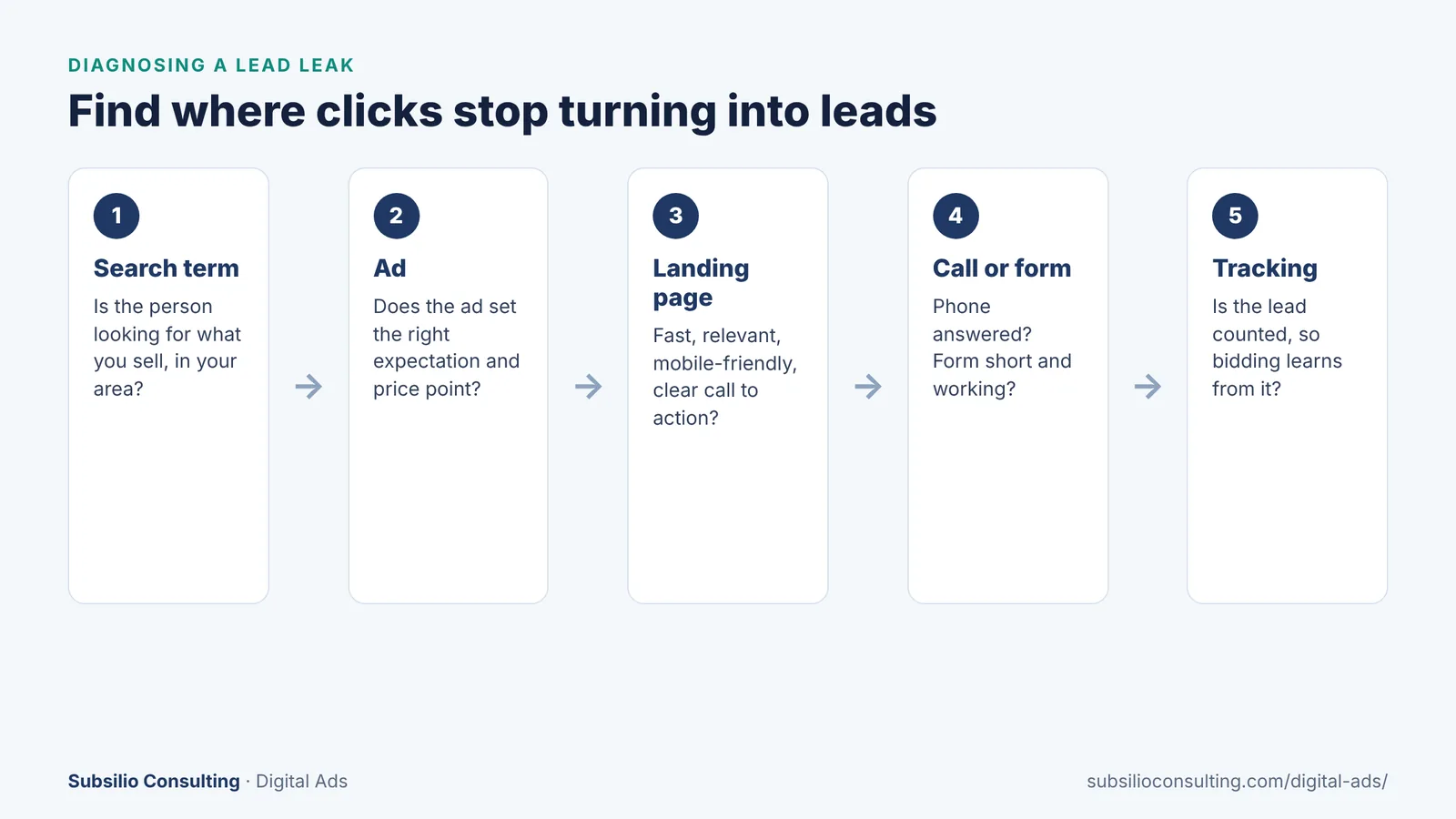
Leads can leak at any step between the search and the tracked conversion.
Before changing anything, look at the whole path a customer takes:
- Search term: were they looking for what you sell, in your area?
- Ad: did your ad set the right expectation about service, price and location?
- Landing page: did the page load quickly and make it easy to act?
- Call or form: was the call answered, and did the form work?
- Tracking: was the lead recorded so Google can learn from it?
A problem at any one step breaks the chain. The checklist below follows the same order of priority we use in audits.
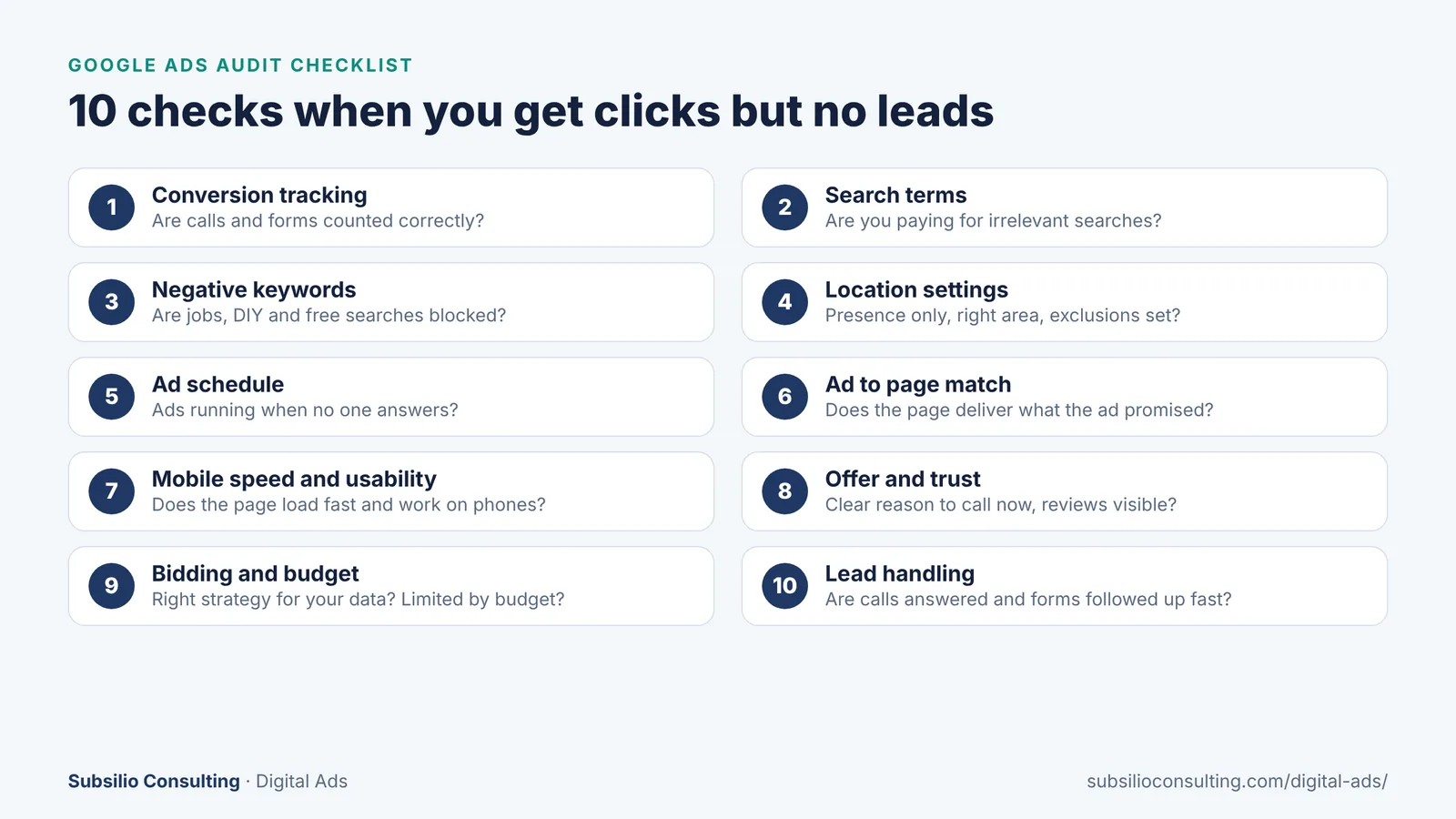
The full 10-point checklist at a glance.
1. Is Conversion Tracking Working Correctly?
Why it matters: if tracking is broken, you might have leads you can’t see, or you might be counting things that aren’t leads. Either way, Google’s bidding is learning from the wrong signals.
What to check:
- Open the Conversions section in Google Ads. Are your key actions (calls, form submissions, bookings, purchases) set up and recording?
- Is each conversion action marked as primary or secondary correctly? Only real leads should be primary.
- Are you counting junk, such as page views, button clicks with no submission, or every visit to a “thank you” page including reloads?
- Are phone calls from ads tracked, with a sensible minimum call length? Google’s guide to measuring calls from ads explains how calls longer than a duration you choose can be counted.
- Do the numbers roughly match what your team actually received?
Google’s overview of conversion measurement is a useful reference for what can be tracked.
2. What Are People Actually Searching For?
Why it matters: your keywords are not the same as the searches that trigger your ads. Broad and phrase match keywords can match searches you never intended.
What to check: open the search terms report for the last 30 to 90 days and sort by cost. Look for:
- Job seekers (“roofing jobs,” “dental assistant hiring”).
- DIY and research searches (“how to fix,” “what causes,” “course”).
- Wrong services you don’t offer.
- Locations you don’t serve.
- Competitor or brand names you shouldn’t be paying for.
- Searches for free or extremely cheap options when you are a premium provider.
3. Are Negative Keywords Blocking Wasted Searches?
Why it matters: negative keywords prevent your ads from showing for searches that will never become customers. Many accounts have few or none.
What to check:
- Is there a shared negative keyword list applied to all relevant campaigns?
- Does it include common non-buyer terms like jobs, careers, salary, DIY, tutorial, free, used and training (where they apply)?
- Are negatives being added regularly from the search terms report?
- Are any negatives accidentally blocking good searches? Over-blocking can be as harmful as under-blocking.
4. Are Location Settings Sending Ads to the Wrong People?
Why it matters: if your ads reach people outside your service area, you pay for clicks that can never become customers.
What to check:
- Location option: Google’s default is “Presence or Interest.” For most local businesses, “Presence” is the better choice. Google’s guide to advanced location options explains the difference.
- Target area: does it match where you actually work? Exclude areas you don’t serve.
- Location report: check where clicks and costs are actually coming from.
5. Are Ads Running When No One Can Answer?
Why it matters: if most of your leads come by phone and calls go unanswered after hours, ads running at night may be wasted.
What to check:
- Review performance by day and hour.
- Use ad scheduling to pause ads or lower bids when no one is available, or raise bids when your team is ready.
- If you offer after-hours service, confirm calls are answered or forwarded.
6. Does the Landing Page Match the Ad?
Why it matters: if someone searches “water heater replacement,” clicks an ad about water heater replacement and lands on a generic home page, many will leave.
What to check:
- Does each ad group send people to the most relevant page?
- Does the page headline repeat what the person searched for and what the ad promised?
- Is the main call to action obvious and above the fold?
- Is the offer (free estimate, same-day service, financing) consistent between ad and page?
Google’s Quality Score diagnostics include “landing page experience,” which can point to pages that need work.
7. Is the Page Fast and Easy to Use on a Phone?
Why it matters: many local searches happen on mobile. A slow page, tiny buttons or a form that is hard to complete on a phone will lose leads you already paid for.
What to check:
- Test the page with Google’s PageSpeed Insights.
- Open the page on your own phone. Can you call with one tap? Can you fill out the form easily?
- Remove pop-ups that block the content on mobile.
- Keep forms short. Ask only for what you need to follow up.
Our technical SEO checklist for local businesses covers mobile speed fixes that help both ads and SEO. If the page needs rebuilding, our web design team builds landing pages for paid traffic.
8. Is There a Clear Offer and Enough Trust?
Why it matters: sometimes everything technical is right, but visitors still don’t act because they aren’t convinced. People compare several businesses before choosing one.
What to check:
- Is there a clear reason to contact you now (free estimate, quick response time, guarantee, financing)?
- Are reviews and ratings visible on the page?
- Are there real photos of your team and your work, not just stock images?
- Are licenses, certifications, warranties and years in business easy to find?
- Is pricing information, or at least a pricing approach, available where appropriate?
Reviews are one of the strongest trust signals a local business can show. Our reputation marketing service and guide on how to ask customers for reviews can help.
9. Are Bidding and Budget Set Up to Learn?
Why it matters: the wrong bid strategy or a budget spread too thin can stop campaigns from getting enough data to improve.
What to check:
- Bid strategy vs data: smart bidding strategies that aim for conversions work best when they have enough accurate conversion data. With broken tracking, they optimize toward the wrong goal.
- Budget spread: is a small budget split across too many campaigns or keywords? Focus on your most profitable services first.
- Limited by budget: are your best campaigns capped while weaker ones keep spending?
- Daily spend expectations: Google’s guide on overdelivery and average daily budgets explains that a campaign might spend up to twice its average daily budget on a given day, but no more than 30.4 times the daily average over a month.
- Ad Rank factors: Google’s Ad Rank explanation shows how bids, ad quality, landing pages and assets work together. More money is not always the fix.
10. Are Leads Being Answered and Followed Up?
Why it matters: this is the step most audits skip, and it is often where the real problem is. Leads may be coming in and being lost.
What to check:
- Call your own tracking number during business hours. Does someone answer professionally?
- Check missed calls and voicemail. Are they returned quickly?
- Submit your own form. Does it arrive? Who receives it? How fast does someone respond?
- Are leads recorded in a CRM or spreadsheet so you can see which became customers?
- Is the person answering trained to book the appointment, not just take a message?
If leads are arriving but not converting, the solution may be a sales process fix, not an advertising fix.
How to Prioritize What You Find
Not every issue has the same impact. We typically fix things in this order:
| Priority | Fix | Why first |
|---|---|---|
| 1 | Tracking and lead handling | Without them you can’t measure or capture results |
| 2 | Search terms, negatives and location | Stops wasted spend immediately |
| 3 | Landing page, speed and trust | Turns more existing clicks into leads |
| 4 | Ad copy and assets | Improves click quality and relevance |
| 5 | Bidding and budget | Works best once data and conversions are reliable |
After fixes, give the account time to collect fresh data before making the next round of changes. Constant edits make it hard to know what worked. To test changes properly, see our guide to A/B testing paid ads on a small budget.
How Often Should You Audit Your Google Ads Account?
- Weekly: search terms, negative keywords, budget pacing and any sudden changes in results.
- Monthly: conversion tracking accuracy, landing page performance, ad tests and location and time reports.
- Quarterly: full account review, including structure, bidding strategy, competitors and new Google features.
- Anytime results drop suddenly: check tracking, website changes and policy notices first.
Conclusion: Clicks Without Leads Is a Fixable Problem
When Google Ads produces clicks but not leads, it is tempting to conclude that “Google Ads doesn’t work for my business.” Usually, that’s not the case. The account is paying for the wrong searches, showing ads to the wrong area or at the wrong times, sending people to pages that don’t convert, missing calls or simply not tracking what’s happening.
Work through these 10 checks and you will almost certainly find something to fix. Start with tracking and lead handling, then stop the wasted spend, then improve the pages and ads that turn clicks into customers.
If you would rather have experienced eyes on your account, our team runs this audit for Denver businesses and explains exactly what we find in plain English. Learn about our digital ads management or request your free ad audit.
Want Us to Run the Checklist for You?
Get a free Google Ads audit with a clear list of what to fix first, and why.
Frequently Asked Questions About Google Ads Audits
Q1. Why am I getting clicks but no leads from Google Ads?
The most common causes are broken conversion tracking, paying for irrelevant searches, location settings that reach people outside your area, landing pages that don’t match the ad or load slowly, a weak offer, and calls or forms that aren’t answered quickly. Work through each step from search to follow-up to find the leak.
Q2. What should a Google Ads audit include?
A Google Ads audit should review conversion tracking, search terms, negative keywords, location and schedule settings, ad and landing page relevance, mobile speed and usability, trust signals and offers, bidding and budget, and how leads are handled after they arrive.
Q3. How do I check if my Google Ads conversion tracking is working?
Open the Conversions section in Google Ads and confirm your key actions are recording. Then submit a test form and make a test call to see whether they are counted. Compare Google Ads conversions with the leads your team actually received over the same period.
Q4. How often should I review my search terms report?
Review your search terms report at least weekly for active accounts, and more often for new campaigns or accounts using broad match. Add negative keywords for irrelevant searches and new keywords for valuable searches you find.
Q5. Can a bad landing page stop Google Ads from working?
Yes. Even well-targeted ads fail if the landing page is slow, confusing, doesn’t match the ad or makes it hard to call or submit a form. Landing page experience also influences Google’s view of ad quality, which can affect your costs.
Q6. How long after an audit should I see better results?
Some fixes, such as blocking irrelevant searches or correcting location settings, can reduce wasted spend quickly. Changes to bidding, landing pages and ads usually need several weeks of new data before you can judge them fairly.
Q7. Should I pause my Google Ads if they aren’t producing leads?
Pausing stops the spend but also stops the data. A better first step is an audit to find out why ads aren’t converting. If tracking or the website is broken, pause or reduce spend until it’s fixed, then restart with corrected settings.
Q8. Do I need an agency to audit my Google Ads account?
Not necessarily. You can work through this checklist yourself. An experienced auditor can often spot issues faster and explain which fixes will have the biggest impact. Whoever does it, make sure you keep admin access to your own account.