
DIGITAL ADS
What Is Retargeting? How to Bring Back Website Visitors Who Didn’t Call or Buy
Most visitors leave without calling or buying. Retargeting brings the warm ones back, if you set it up the right way.
ESTIMATED READ TIME: 11 MINUTES
Want an outside read on whether your ads are earning their keep?
Think about the last time you researched something important: a new roof, a dentist, a piece of software, a family vacation. You probably didn’t decide on the first visit. You looked, left, compared, got distracted and came back later.
Your customers do the same thing. Most people who visit your website for the first time leave without calling, booking or buying. That doesn’t mean they aren’t interested. It usually means they aren’t ready yet, or something interrupted them. Retargeting is how you stay in front of those people until they are.
This guide explains what retargeting is, how it works, how it differs from remarketing, how long to follow up, what to say in your ads and how to stay on the right side of privacy rules. Retargeting is one of the core services we run for clients, so this is drawn from what we see work, and fail, in real campaigns.
Key takeaways
- Retargeting shows ads to people who have already visited your website, used your app or engaged with your brand.
- It works because warm visitors already know who you are, so they are often more likely to come back and convert than strangers.
- Retargeting and remarketing are often used interchangeably.
- Strictly, retargeting usually means ads; remarketing can also include email.
- The best results come from splitting visitors by intent and matching the message to how close they were to buying.
- Retargeting requires a clear privacy policy, consent where required and respect for platform rules on sensitive categories.
What Is Retargeting?
Retargeting is a form of online advertising that shows your ads to people who have already interacted with your business. Most often, that means people who visited your website. After they leave, they can see your ads on other websites, in apps, on social media, on YouTube or in search results.
Google calls these audiences “your data segments.” According to Google’s guide to your data segments, they are a way to re-engage people who previously interacted with your brand, and can be built from website visitors, YouTube users, app users, lead form interactions and customer lists.
The idea is simple: instead of paying to introduce your business to strangers over and over, you spend part of your budget reminding people who already showed interest.
How Retargeting Works, Step by Step
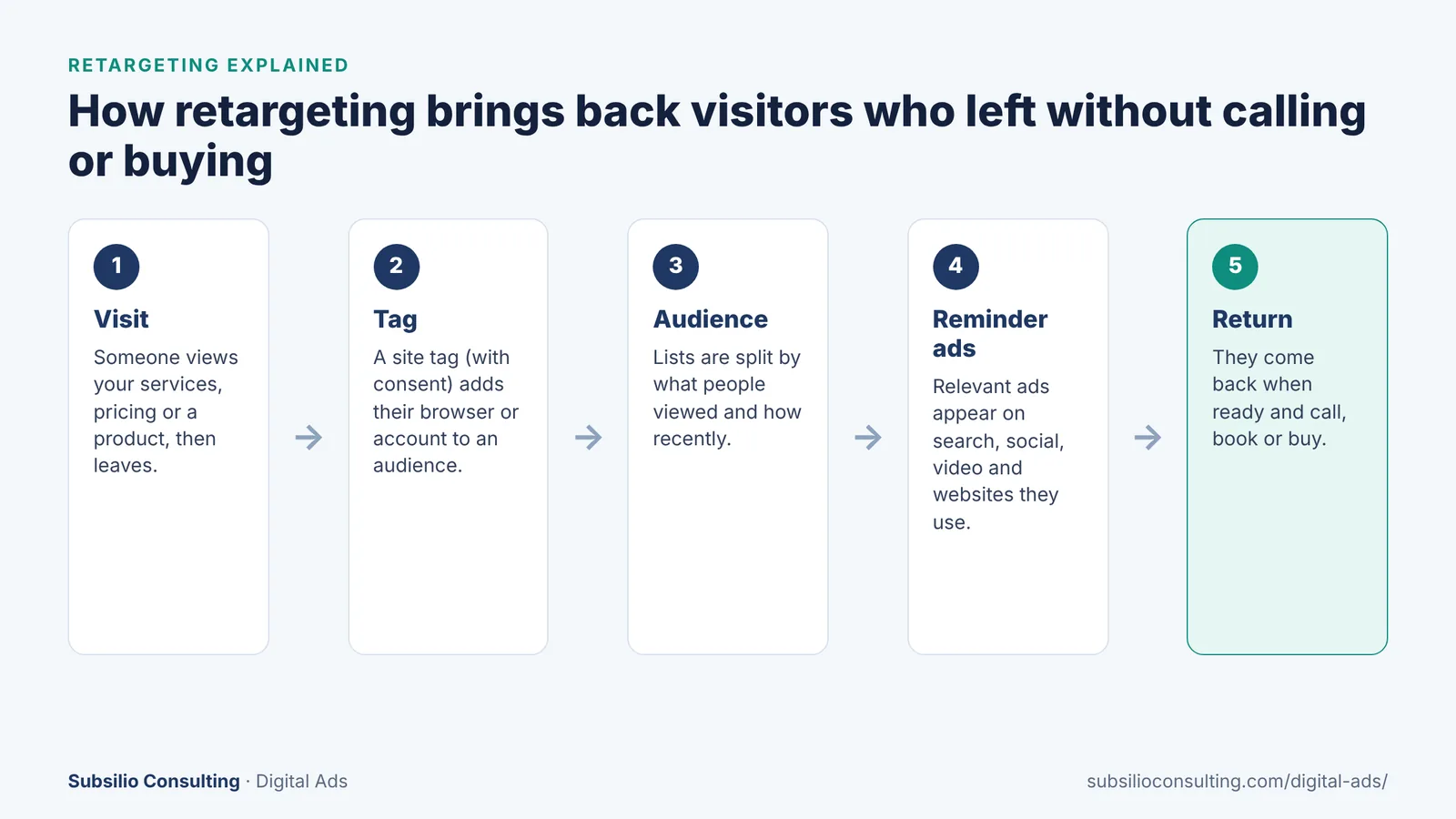
How a website visit turns into a retargeting audience and, later, a returning customer.
- Someone visits your website. They look at a service, a product or your pricing, then leave.
- A tag records the visit. A small piece of code on your site (such as the Google tag or the Meta Pixel) notes that this browser or account visited, subject to the visitor’s consent settings.
- The visitor joins an audience. You can build audiences based on which pages people viewed, what they did and how recently they visited.
- Your ads follow up. When people in the audience browse other sites, apps or social media, the ad platform can show them your ads.
- They come back. When they are ready, they return to call, book or buy, often after seeing your name a few times.
Retargeting doesn’t reveal who your visitors are. You see audience sizes and results, not names. The ad platforms handle matching people to audiences.
Retargeting vs Remarketing: Is There a Difference?
The two terms are often used as if they mean the same thing, and many platforms use them interchangeably. When people do separate them, this is usually what they mean:
| Term | Usually means | Channels | Example |
|---|---|---|---|
| Retargeting | Paid ads shown to past website visitors or engaged users | Display, social, search, video | A visitor to your roofing page sees your ad on social media the next day |
| Remarketing | Re-engaging past visitors or customers, including by email | Email, SMS, plus paid ads | A shopper who left items in their cart gets a reminder email |
| Customer list targeting | Ads shown to people on your own customer or lead lists | Search, social, video, display | Past customers see an ad for a seasonal service |
In practice, what matters is the strategy, not the label. A strong program usually combines ad retargeting with email follow-up for people who shared their contact details.
Why Retargeting Works So Well
- Familiarity builds trust. People are more comfortable calling a business they have seen several times.
- It catches people when they are ready. Buying decisions take time. Retargeting keeps you visible when the moment comes.
- It is efficient. You focus spend on people who already showed interest, instead of strangers.
- It supports every other channel. Visitors from Google Ads, SEO, social media, email and even geofencing campaigns can all be retargeted.
That last point is important. Retargeting multiplies the value of your other marketing. If you are paying for clicks from search ads, retargeting gives those visitors a second, third and fourth chance to convert.
Types of Retargeting You Can Use
Website retargeting
The most common type. Show ads to people who visited your site or specific pages. Works across display networks, social media and video.
Search retargeting
Adjust bids or ads when past visitors search on Google again. A past visitor searching your service a second time is often close to deciding, so it can be worth bidding more for them.
Social media retargeting
Show ads on Facebook, Instagram and LinkedIn to people who visited your site or engaged with your content, such as watching a video or opening a lead form. Read more in our guide to organic social media vs paid social ads.
Video retargeting
Show YouTube or social video ads to past visitors. Video is a strong way to tell your story, show your team or feature customer testimonials.
Dynamic retargeting for e-commerce
Show people the exact products they viewed or left in their cart. This is one of the most effective forms of retargeting for online stores, because the ad shows precisely what the shopper was considering.
Customer list retargeting
Upload lists of past customers or leads (with permission) to show them ads for repeat services, upgrades or referral offers. Google calls this Customer Match.
Match the Message to the Visitor’s Intent
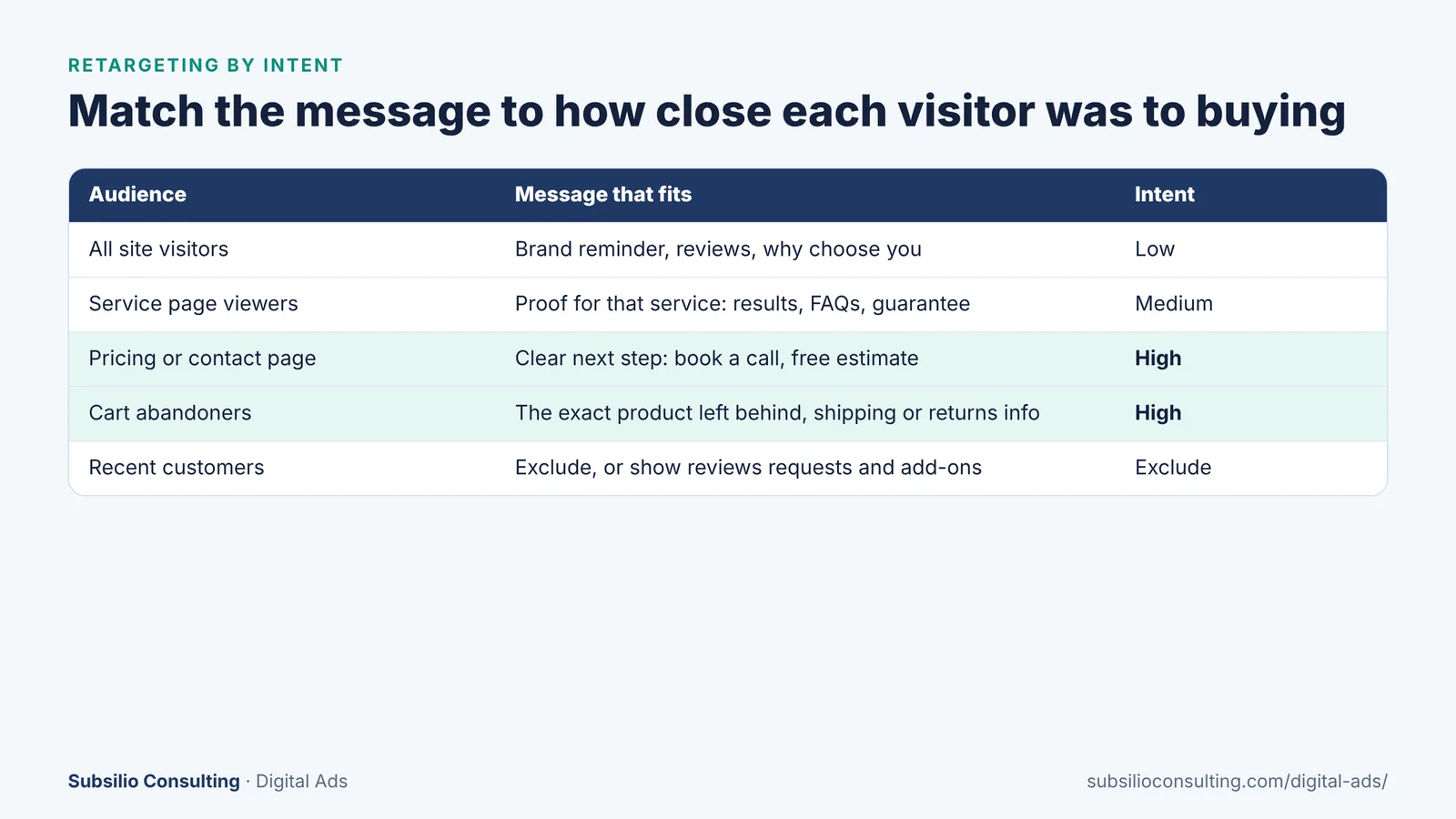
Segment by intent so each audience gets the message that moves it forward.
The biggest mistake we see is showing every visitor the same generic ad. Someone who read one blog post is not in the same place as someone who opened your contact page. Segment your audiences by intent:
- All visitors (low intent): introduce your brand, show reviews and explain why people choose you.
- Service or product page viewers (medium intent): show proof for that specific service, such as before-and-after photos, a guarantee or FAQs.
- Pricing, contact or quote page visitors (high intent): make the next step easy with a clear call to action, such as “Book your free estimate.”
- Cart abandoners (high intent): show the exact items left behind and answer common objections (shipping, returns, financing).
- Recent customers: exclude them from acquisition ads, or show them review requests, add-ons or referral offers.
Reviews are especially powerful in retargeting ads, because they answer the question visitors ask while comparing: “Can I trust these people?” Our reputation marketing service and guide on how to ask customers for reviews can help you build that proof.
How Long Should a Retargeting Campaign Follow Someone?
Most platforms let you choose how long a person stays in a retargeting audience after their visit. The right window depends on how long your customers take to decide:
| Business type | Typical decision time | Retargeting window to consider |
|---|---|---|
| Restaurants, impulse retail | Hours to days | Short: days to a couple of weeks |
| Emergency and urgent services | Same day | Short window, high bids in the first days |
| Most home and professional services | Days to weeks | Medium: about 30 to 90 days |
| Big-ticket purchases, remodels, B2B services | Weeks to months | Longer windows, with messages that change over time |
These are starting points based on typical buying cycles, not rules. Test different windows and compare results.
At Subsilio, we typically follow website visitors for one to three months for service businesses, and adjust based on results. Whatever the window, use frequency caps so people don’t see your ads so often that they get annoyed. Retargeting should feel like a helpful reminder, not like being followed.
How to Set Up Retargeting
- Install tracking tags such as the Google tag and Meta Pixel on every page, ideally through a tag manager.
- Set up consent management where required, and update your privacy policy to explain your use of advertising cookies and data.
- Create audiences by page, behavior and time window, as outlined above.
- Exclude converters so people who already called or bought don’t keep seeing acquisition ads.
- Create ads for each audience, with messages that match their intent.
- Set frequency caps and a schedule.
- Send people to the right page, such as a specific service page or their abandoned cart, not your home page.
- Measure conversions, including calls and form fills, and compare results by audience.
Privacy Rules and Platform Policies
Retargeting relies on data about website visits, so you need to follow both the law and platform policies.
- State privacy laws: in Colorado, the Colorado Privacy Act gives consumers the right to opt out of targeted advertising, for businesses that meet the law’s thresholds. Other states have similar laws.
- Consent and transparency: your website should explain how you use cookies and advertising data, and offer opt-outs where required.
- Sensitive categories: Google restricts advertiser-curated audiences, including retargeting lists, for businesses in sensitive interest categories such as health, religious beliefs and negative financial status. If you are in healthcare, for example, standard website retargeting may not be allowed on Google.
- Respectful ads: don’t write ads that imply you know personal details about the viewer.
This is general information, not legal advice. Talk to a qualified professional about your specific obligations.
Common Retargeting Mistakes
- Showing the same ad to every visitor regardless of intent.
- No frequency cap, which leads to ad fatigue and annoyance.
- Not excluding people who already converted.
- Retargeting windows that don’t match the buying cycle.
- Sending people to the home page instead of the page they were viewing.
- Running retargeting with too little website traffic. Audiences need to reach a minimum size before platforms will show ads to them.
- Ignoring privacy policies, consent and platform restrictions.
Conclusion: Most Visitors Need a Second Chance
Most people who visit your website won’t contact you on their first visit. Retargeting gives you a way to stay in front of them, build trust and bring them back when they are ready, at a much lower cost than finding new strangers.
The difference between retargeting that annoys people and retargeting that brings in customers comes down to strategy: segmenting by intent, matching the message to each audience, choosing the right time window, capping frequency and respecting privacy.
If you are getting website traffic but not enough calls, bookings or sales, retargeting is often the fastest place to start. Our team builds retargeting campaigns across Google, social media and video for businesses in Denver and beyond. Learn about our digital ads services or book a free consultation.
Bring Back the Visitors You Already Paid For
We will set up retargeting that matches your sales cycle, respects privacy rules and is measured on real leads.
Frequently Asked Questions About Retargeting
Q1. What is retargeting in simple terms?
Retargeting is showing ads to people who have already visited your website or engaged with your business. After they leave your site, they can see your ads on other websites, social media, YouTube or search, reminding them about you until they are ready to contact you or buy.
Q2. What is the difference between retargeting and remarketing?
The terms are often used interchangeably. When separated, retargeting usually means paid ads shown to past website visitors, while remarketing can also include email or SMS follow-up with past visitors and customers. Both aim to bring back people who already showed interest.
Q3. How long should retargeting ads run?
Match the retargeting window to how long your customers take to decide. Restaurants and impulse purchases may need only days. Many home and professional services work well with roughly 30 to 90 days. Big-ticket and B2B purchases may need longer, with messages that change over time.
Q4. How much website traffic do I need for retargeting?
You need enough visitors for your audiences to reach the minimum size each ad platform requires before it will show ads. Small websites can still retarget by combining audiences, using longer windows or adding social media engagement audiences. Driving more traffic through search ads or SEO also helps.
Q5. Is retargeting legal?
Yes, retargeting is legal when you follow privacy laws and platform policies. That means a clear privacy policy, consent where required, honoring opt-outs from targeted advertising and following platform restrictions on sensitive categories such as health. Requirements vary by state, so check the rules that apply to your business.
Q6. Can healthcare businesses use retargeting?
It depends on the platform and the service. Google restricts advertiser-curated audiences, including retargeting lists, for sensitive interest categories such as health. Healthcare businesses often need other approaches, such as contextual targeting, broad audiences and strong search campaigns. Get compliance advice before launching.
Q7. What is abandoned cart retargeting?
Abandoned cart retargeting shows ads to online shoppers who added items to their cart but didn’t complete the purchase. Dynamic ads can show the exact products left behind. It is often combined with reminder emails for shoppers who entered their email address.
Q8. How often should someone see my retargeting ads?
Use frequency caps to limit how often each person sees your ads. The right number depends on the platform and your buying cycle, but the goal is a helpful reminder, not repetition. Watch for falling click rates and negative feedback, which are signs people are seeing your ads too often.