
GOOGLE ADS
How to Improve Google Ads Quality Score and Lower Cost Per Click
What Quality Score measures, how it connects to Ad Rank and cost per click, and step-by-step fixes for each component.
ESTIMATED READ TIME: 10 MINUTES
Paying too much for every click?
Two businesses bid on the same keyword in the same city. One pays noticeably less per click and still shows above the other. How?
The answer is ad quality. Google doesn’t simply sell the top spot to the highest bidder. It rewards ads that are relevant to the search and lead to useful landing pages. Quality Score is Google’s way of showing you how your ads measure up, and it points straight to what you need to fix.
This guide explains what Quality Score really is (and what it isn’t), how it connects to Ad Rank and your cost per click, and the practical steps we use at Subsilio Consulting to improve each component in the Google Ads accounts we manage.
Key Takeaways
- Quality Score is a 1–10 diagnostic score at the keyword level, based on expected clickthrough rate, ad relevance and landing page experience.
- Google says Quality Score is a diagnostic tool, not an input in the ad auction. The auction uses real-time quality signals, which Quality Score summarises.
- Higher ad quality generally leads to better positions and lower costs. Better ads can beat higher bids.
- Fix the component marked “Below average” first. Each one points to a different fix.
- Don’t chase a perfect 10. Use Quality Score to find weak spots, and judge success by conversions and cost per lead.
What Is Google Ads Quality Score?
Google describes Quality Score as a diagnostic tool meant to give you a sense of how your ad quality compares with other advertisers. It is reported on a scale of 1 to 10 for each keyword in Search campaigns, and it’s based on three components:
- Expected clickthrough rate (CTR): how likely your ad is to be clicked when shown.
- Ad relevance: how closely your ad matches the intent behind a user’s search.
- Landing page experience: how relevant and useful your landing page is to people who click your ad.
Each component is rated Above average, Average or Below average. Those ratings are more useful than the 1–10 number, because they tell you exactly where the problem is.
Quality Score vs. Ad Rank: What Actually Sets Your Cost
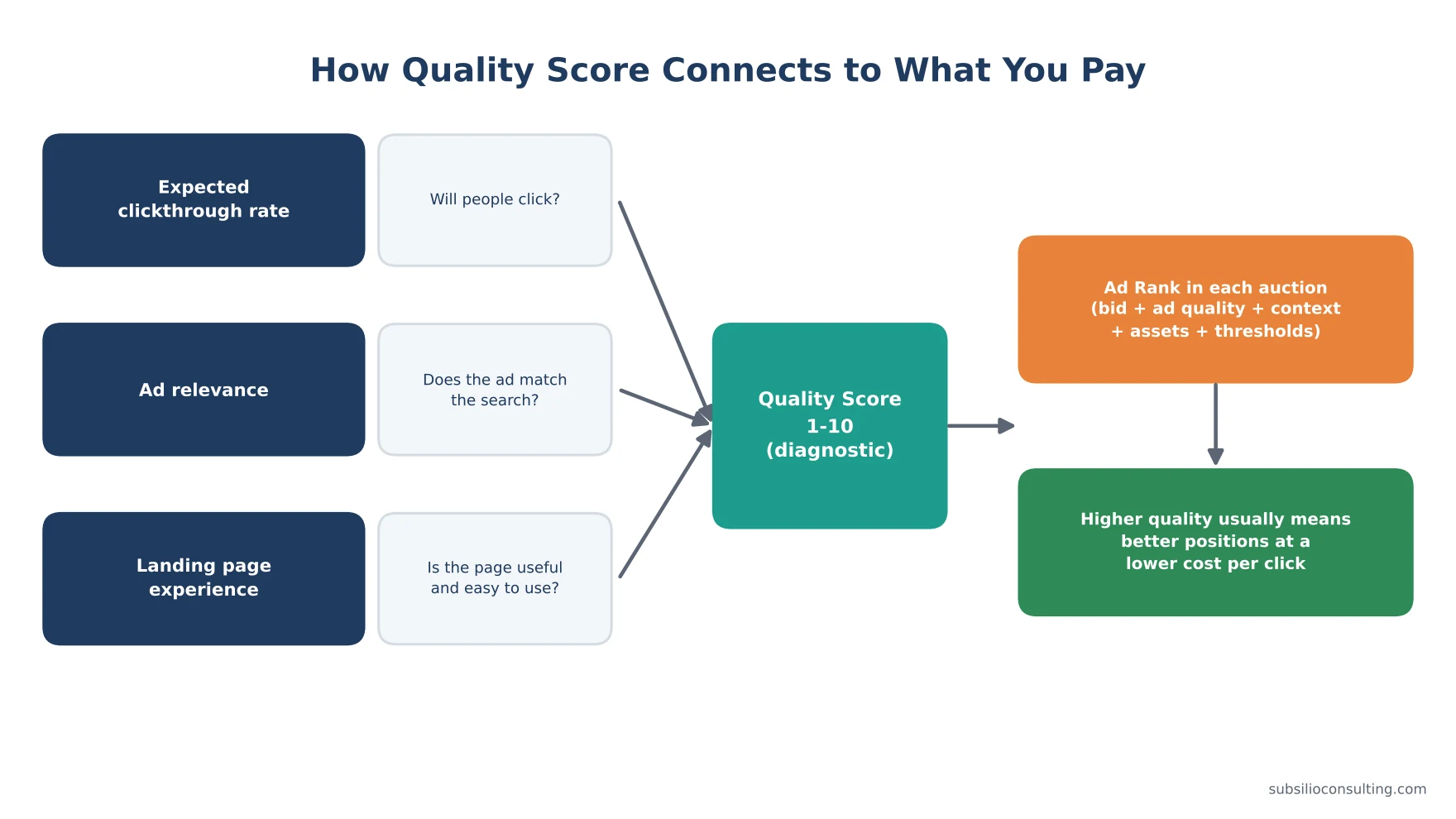
Quality Score is a diagnostic. Ad Rank in each auction decides your position and cost.
This is where many guides get it wrong. Quality Score itself isn’t fed into the auction. Instead, every time someone searches, Google calculates Ad Rank, which decides whether your ad shows and where. Ad Rank considers:
- Your bid
- The quality of your ads and landing page at auction time (including expected CTR, ad relevance and landing page experience)
- Ad Rank thresholds (minimum quality levels an ad must reach to show)
- The competitiveness of the auction
- The context of the search (such as location, device and time)
- The expected impact of your assets and other ad formats
Quality Score is the summary you can see in your account of that auction-time quality. So while you can’t “raise Quality Score” and directly change a price, the things that improve Quality Score are the same things that improve Ad Rank.
Google is clear on the benefit. Its page about ad quality says higher ad quality generally leads to better performance, including better ad positions and lower cost. Google also explains in its article on Ad Rank thresholds that lower-quality ads face higher thresholds, which means they need higher bids just to show.
What Does Not Affect Quality Score
Google’s guidance also clears up a few myths:
- Your bid affects Ad Rank, not your quality assessment.
- How often your ads show doesn’t affect ad quality.
- Reported conversions don’t affect ad quality.
How to Check Your Quality Score
- In Google Ads, go to your Keywords view.
- Click Columns and add Quality Score, Exp. CTR, Ad relevance and Landing page exp.
- You can also add the “(hist.)” versions to see how scores changed over time.
- Sort by spend, not by score. A low score on a keyword that spends a lot matters far more than a low score on one that barely runs.
If you see a dash instead of a number, Google doesn’t have enough data on that keyword yet.
The Quality Score Fix Finder
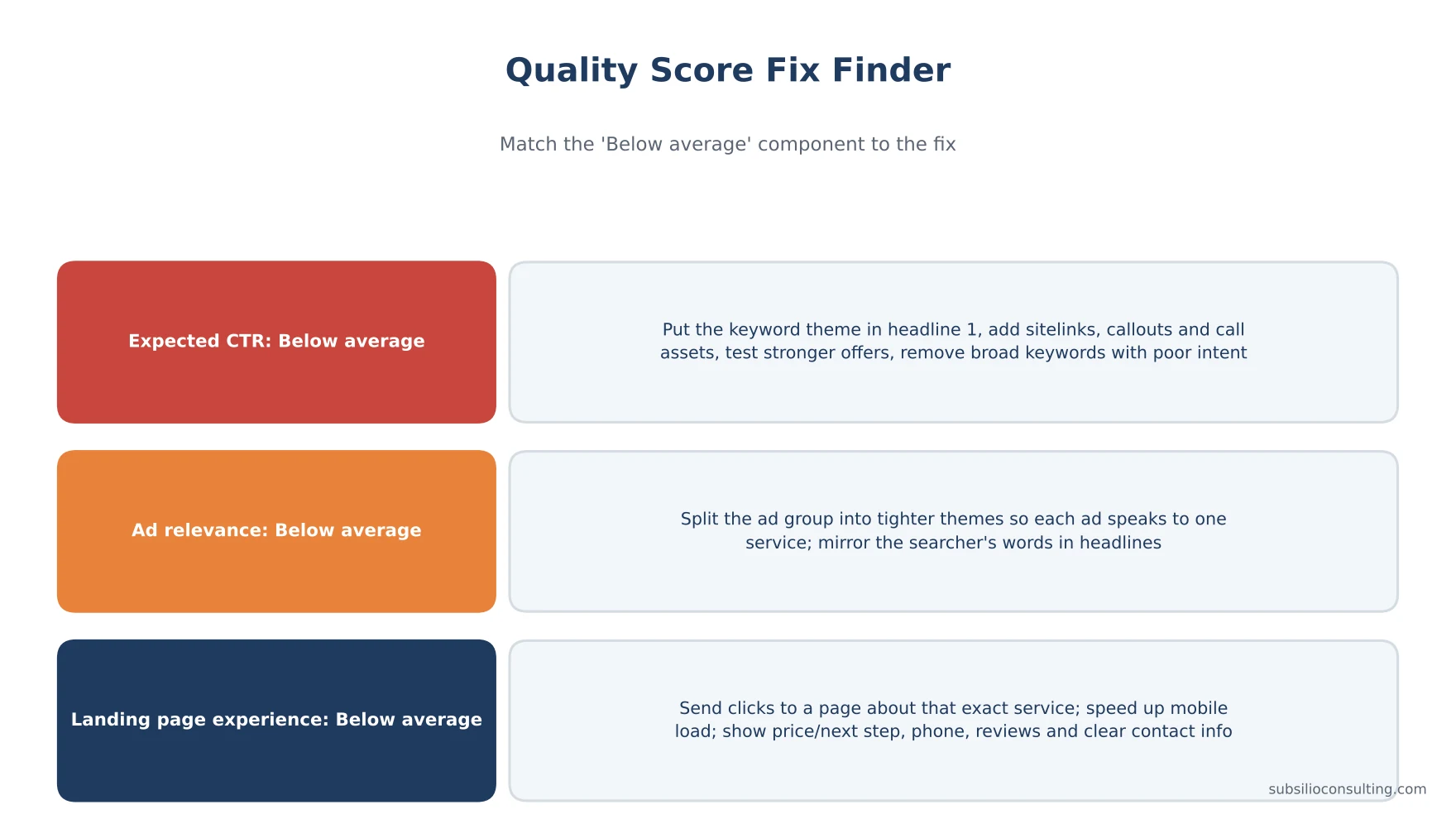
Match the ‘Below average’ component to the fix.
Start with your highest-spending keywords and look at which component is “Below average.” Then use the matching section below.
How to Improve Expected Clickthrough Rate
Expected CTR is Google’s prediction of how likely people are to click your ad for that keyword, adjusted for position and other factors.
1. Put the Search in the Headline
People click ads that clearly match what they typed. If someone searches “emergency water heater repair,” a headline that says exactly that will usually beat a generic “Quality Plumbing Services.”
2. Lead With a Reason to Choose You
Give people a specific benefit: same-day service, upfront pricing, free estimates, warranty, years in business, review rating. Only use claims you can back up.
3. Use Every Relevant Asset
Sitelinks, callouts, structured snippets, call assets, location assets, price assets and image assets make your ad larger and more useful. Google includes the expected impact of assets when calculating Ad Rank, and it costs nothing to add them.
4. Build Strong Responsive Search Ads
Give Google plenty of distinct headlines and descriptions to test. Google’s own data, shared on its Ad Strength help page, says advertisers who improve Ad Strength for responsive search ads and sitelinks from “Poor” to “Excellent” see 15% more conversions on average. Note that Google also says Ad Strength doesn’t directly affect whether your ad can show. Treat it as guidance on variety and relevance, not a score to chase.
5. Remove Keywords That Attract the Wrong Clicks
Broad keywords that match loosely related searches can drag down CTR. Use the search terms report to find poor matches, then add negative keywords or tighten match types.
6. Test Your Offer
Sometimes the copy isn’t the problem. The offer is. Test “Free estimate” vs. “$50 off first service” vs. “Book online in 60 seconds.”
How to Improve Ad Relevance
Ad relevance measures how well your ad matches the meaning behind the search.
1. Tighten Your Ad Groups
This is the most effective fix. Group keywords by a single theme, then write ads for that theme. Google’s own Quality Score guidance recommends splitting ad groups with different keywords into multiple ad groups that better match people’s searches.
Before: one ad group called “Plumbing” with keywords for drain cleaning, water heaters, leak repair and sewer lines, and one generic ad.
After: separate ad groups for drain cleaning, water heater repair, leak detection and sewer line repair, each with ads that use those words.
2. Mirror the Searcher’s Language
Use the words customers use, not internal jargon. Check your search terms report for the exact phrases people type.
3. Match the Keyword to the Intent
“Water heater installation” and “water heater repair” might look similar, but they are different jobs. Make sure your ad speaks to the right one.
4. Remove Keywords That Don’t Fit
If a keyword doesn’t fit any ad you could write, it may not belong in the account.
How to Improve Landing Page Experience
Landing page experience reflects how relevant and useful your page is to people who click your ad.
1. Send Each Ad Group to the Most Relevant Page
A “brake repair” ad should land on a brake repair page, not your homepage. This is often the biggest single fix.
2. Make the Page Answer the Search
The headline should confirm the visitor is in the right place. The page should explain the service, what’s included, how it works, and what happens next.
3. Make It Easy to Act
Put the phone number at the top (tap-to-call on mobile), add a short form, and use clear buttons. Don’t make visitors hunt.
4. Build Trust
Show reviews, ratings, certifications, guarantees, photos of real work and your team. Our reputation marketing service helps businesses build the reviews that make landing pages more convincing.
5. Speed It Up, Especially on Mobile
Slow pages lose visitors. Test your page with Google’s PageSpeed Insights and fix large images, heavy scripts and slow hosting.
6. Be Transparent
Clear business information, contact details, pricing or price ranges where possible, and a privacy policy all help visitors trust the page.
Google also suggests using conversion rate as a proxy for good landing page experience. It doesn’t change the rating directly, but a page that converts well is usually a page people find useful. If your pages need a rebuild, our web design team builds landing pages for paid traffic.
Other Ways to Lower Cost Per Click
Quality is the biggest lever, but not the only one:
- Target the right area. Don’t compete for searches outside your service area.
- Schedule ads for hours when leads are most valuable or when you can answer the phone.
- Use the right bid strategy for your goals and data volume.
- Focus on profitable keywords. Pause or lower bids on keywords that spend without converting.
- Protect your brand search with a low-cost brand campaign.
- Fix conversion tracking so smart bidding learns from real leads. See our guide to Google Ads and Facebook Ads conversion tracking.
A 30-Day Quality Score Improvement Plan
| Week | Focus | Actions |
|---|---|---|
| Week 1 | Diagnose | Add QS columns, sort by spend, list keywords with “Below average” components, review search terms |
| Week 2 | Restructure | Split broad ad groups into tight themes, add negative keywords, pause poor-fit keywords |
| Week 3 | Rewrite | New responsive search ads for each ad group, add all relevant assets, test offers |
| Week 4 | Landing pages | Point ad groups to matching pages, improve mobile speed, add trust signals and clear calls to action |
| Ongoing | Measure | Check component ratings, CTR, conversion rate and cost per lead over the following weeks |
Give changes time. Quality Score updates as new data comes in, and you should judge progress over weeks, not days.
Quality Score Mistakes to Avoid
- Chasing a 10 on every keyword. Some valuable keywords will never reach 10. Focus on profit.
- Ignoring spend. Fix the keywords that cost the most first.
- Deleting and re-adding keywords to “reset” the score. Google evaluates quality based on actual performance across matching searches, so this rarely helps and loses useful history.
- Writing ads for Google instead of people. Stuffing keywords into ads hurts clicks.
- Fixing the ad but not the landing page. All three components work together.
If your account has deeper issues, start with our Google Ads audit checklist.
Conclusion: Better Ads Cost Less
Quality Score is one of the clearest messages Google gives advertisers: make your ads relevant, make them worth clicking, and send people to pages that help them. Do that, and Google rewards you with better positions at a lower cost.
Start with your biggest-spending keywords, find the component rated “Below average,” and apply the matching fix: stronger headlines and assets for CTR, tighter ad groups for relevance, and focused, fast, trustworthy pages for landing page experience. Then measure success by what matters most: more leads at a lower cost per lead.
Want an expert look at your account? Subsilio Consulting offers a free Google Ads review for Denver and US small businesses. Contact us and we’ll show you where your Quality Score and your budget are leaking.
Want to Pay Less for Every Click?
We audit Google Ads accounts for expected CTR, ad relevance and landing page experience, then fix what is costing you money.
Frequently Asked Questions About Google Ads Quality Score
Q1. What is a good Quality Score in Google Ads?
There’s no single target. Scores of 7 and above are generally healthy, but the more useful view is the three components. Aim to have no high-spending keywords rated “Below average” for expected CTR, ad relevance or landing page experience.
Q2. Does Quality Score affect cost per click?
Not directly. Quality Score is a diagnostic. But it summarises the same quality signals that Google uses in Ad Rank, and Google says higher ad quality generally leads to better ad positions and lower costs.
Q3. How long does it take to improve Quality Score?
It depends on how much traffic your keywords get. High-volume keywords can show changes within a few weeks of improvements to ads and landing pages. Low-volume keywords take longer because Google needs more data.
Q4. What are the three components of Quality Score?
The three components are expected clickthrough rate, ad relevance and landing page experience. Each is rated Above average, Average or Below average.
Q5. Does my bid affect Quality Score?
No. Google states that your bid affects Ad Rank but not the assessment of your ad quality.
Q6. Why does my keyword show a dash instead of a Quality Score?
A dash means Google doesn’t have enough data on that keyword yet, usually because it hasn’t received enough impressions or searches.
Q7. Does Quality Score apply to Performance Max or Display campaigns?
Quality Score is reported for keywords in Search campaigns. Other campaign types still use ad quality in their auctions, but don’t show a keyword-level Quality Score.
Q8. Is Ad Strength the same as Quality Score?
No. Ad Strength rates how well your responsive search ad assets are set up. Google says it doesn’t directly affect whether your ad can serve. Quality Score reflects expected CTR, ad relevance and landing page experience at the keyword level.