FACEBOOK ADS
Why Are My Facebook Ads Not Working? 7 Common Problems and How to Fix Them
The seven most common reasons Facebook ads underperform, how to diagnose each one and exactly how to fix it.
ESTIMATED READ TIME: 11 MINUTES
Want an outside look at why your Facebook ads are stalling?
You set up the campaign. You picked an audience, wrote the copy, chose a nice image and set a budget. A week later the money is gone and the results aren’t there. Few leads. No sales. Maybe a handful of likes.
It’s tempting to decide that “Facebook ads don’t work for my business.” Sometimes that’s true. Far more often, the problem is one or two specific, fixable issues: tracking that isn’t recording results, the wrong objective, an audience that’s too narrow, creative that people scroll past, or a landing page that loses people after the click.
This guide walks through the seven most common reasons Facebook and Instagram ads fail for small businesses, how to diagnose each one in Ads Manager, and exactly how to fix it. It’s the same order we work through at Subsilio Consulting when a business asks us to review their Facebook and Instagram ads.
Key Takeaways
- Check tracking first. If the Meta Pixel and Conversions API aren’t recording real leads or sales, Meta can’t optimise and your results look worse than they are.
- Choose an objective that matches the result you want. Engagement and Traffic campaigns rarely produce customers.
- “Learning limited” usually means the ad set isn’t getting enough results. Consolidate, simplify or optimise for a more frequent event.
- Creative is the biggest lever you control. Refresh it regularly and test different hooks, formats and offers.
- Look at where the drop happens (reach, clicks, page views, conversions, lead quality) to know what to fix.
First: Make Sure It’s Really “Not Working”
Before changing anything, check a few things:
- Have you given it enough time? New campaigns go through a learning phase. A few days of uneven results is normal.
- Are you judging by the right metric? Likes and reach are not results. Look at cost per lead or cost per purchase.
- Are you comparing like for like? Results often swing by season, day of the week and offer.
- Did reporting change? In January 2026, Meta stopped returning 7-day view and 28-day view attribution windows in its Ads Insights API, in line with what’s available in Ads Manager. If your reported conversions dropped around then, check your attribution setting before assuming performance fell.
- What does your own data say? Compare Ads Manager with your inbox, CRM, call log or online store.
If results are still poor after that, work through the checklist below in order.
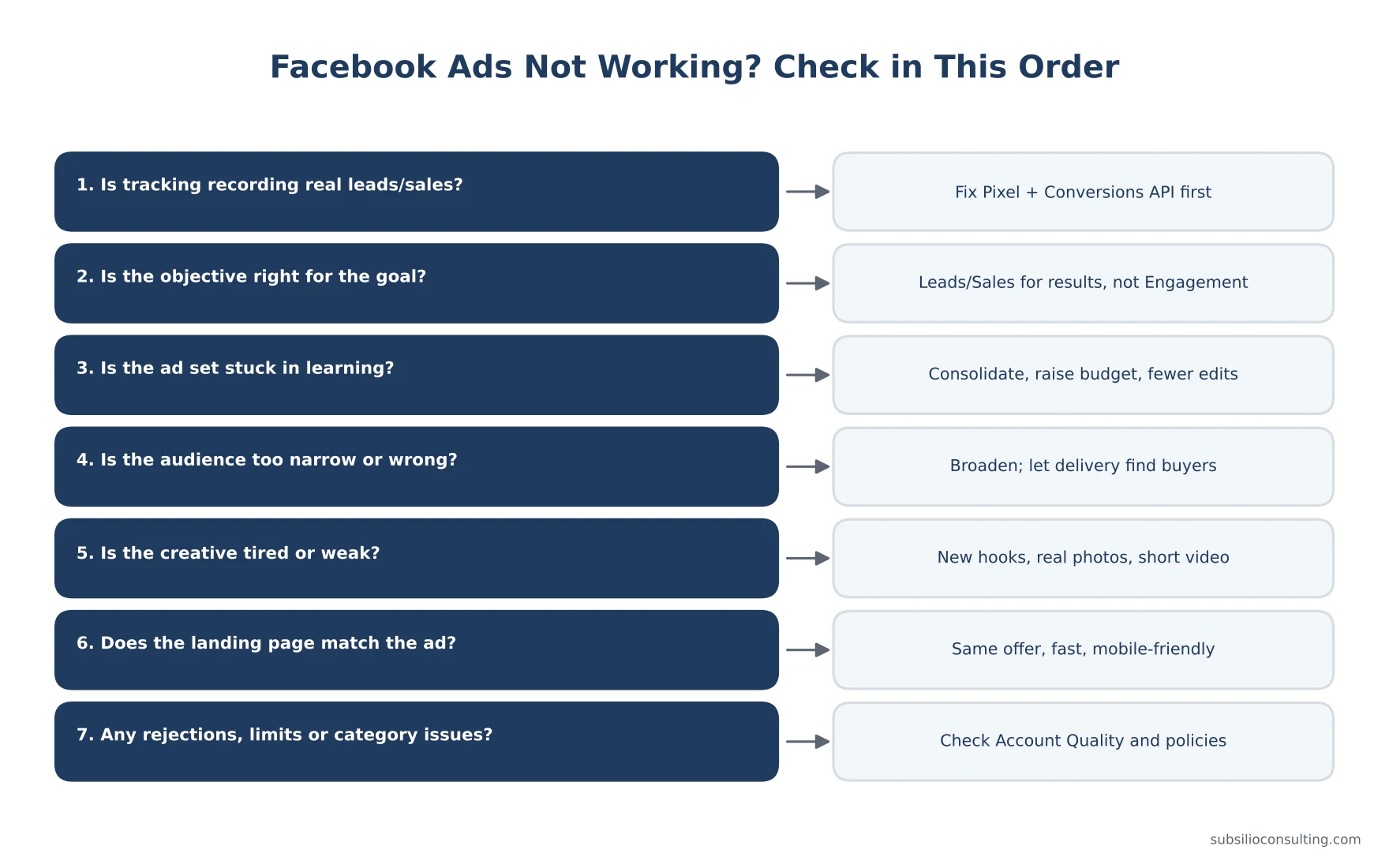
Work through these checks in order before you change the ad.
Problem 1: Your Tracking Is Broken or Incomplete
Signs
- Ads Manager shows few or no results, but you are getting some leads or sales.
- Or the opposite: Ads Manager shows lots of “leads,” but your team received far fewer.
- Events Manager shows warnings, or events are missing.
Why It Matters
Meta’s delivery system learns from the conversions you send it. If it can’t see real results, it can’t find more people like your buyers. It may optimise for whoever is cheapest to reach instead.
How to Fix It
- Open Events Manager and check your dataset (Pixel). Are Lead, Purchase or other key events firing?
- Use Test Events to trigger a real form submission or purchase and confirm it’s received.
- Set up the Conversions API alongside the Meta Pixel, with matching event IDs so events aren’t double counted.
- Check Event Match Quality for server events and send more customer information parameters (hashed) where you’re allowed to.
- Fire events only on completion, for example on the thank-you page or after successful submission, not when someone clicks “Submit” or opens the form.
- Recheck after any website change. New forms, plugins or redesigns often break tracking.
Our guide to Google Ads and Facebook Ads conversion tracking covers the full setup.
Problem 2: You Chose the Wrong Objective
Signs
- Lots of likes, reactions, video views or cheap clicks, but few leads or sales.
- Your campaign uses the Engagement, Awareness or Traffic objective, but you expect leads or sales.
Why It Matters
Meta gives you what you ask for. If you choose Engagement, it finds people who like and comment. If you choose Traffic, it finds people who click. Those are often not the same people who buy.
How to Fix It
- Want leads? Use the Leads objective, with either instant forms or website lead events.
- Want sales or bookings? Use the Sales objective, optimising for Purchase or another conversion event.
- Use Awareness, Traffic or Engagement deliberately, for example to build video audiences you’ll retarget later, and judge them on those goals.
For a full walkthrough of objectives, see our beginner’s guide to Facebook and Instagram ads for small businesses.
Problem 3: Your Ad Set Is Stuck in Learning (or “Learning Limited”)
Signs
- Delivery column says “Learning” for a long time, or “Learning limited.”
- Results and costs swing wildly from day to day.
Why It Matters
Meta says an ad set generally needs about 50 optimisation events in the 7 days after its last significant edit to exit the learning phase. Until then, delivery is less stable. “Learning limited” means Meta predicts the ad set won’t get there at its current setup.
How to Fix It
- Consolidate. Fewer ad sets with more budget each, rather than many small ones splitting the data.
- Broaden the audience so Meta has more room to find results.
- Raise the budget if it’s too small to buy enough results, or
- Optimise for a more frequent event. If purchases are rare, try optimising for Add to Cart or Lead while volume builds, then switch back.
- Stop making frequent edits. Big changes to budget, targeting, creative or optimisation event can restart learning. Batch your changes.
Problem 4: Your Audience Is Too Narrow, Too Broad or Just Wrong
Signs
- Audience size warning, high cost per 1,000 impressions (CPM), or ads barely spending.
- Lots of clicks or leads from people outside your area or who aren’t a fit.
- Frequency climbing fast (the same small group seeing ads over and over).
How to Fix It
- If it’s too narrow: remove stacked interests, widen age ranges, expand location to your full realistic service area. Meta’s delivery often finds buyers more efficiently with broader audiences, as long as tracking and creative are strong.
- If it’s wrong: check your location setting (people living in the area vs. people recently there), exclude current customers if you’re targeting new ones, and add a qualifying question to instant forms.
- Use warm audiences: website visitors, video viewers, Page and Instagram engagers. Retargeting usually converts better than cold audiences.
- Check for Special Ad Category rules. If you advertise housing, employment, or financial products and services, you must declare a Special Ad Category, which limits targeting options. Failing to declare it can lead to rejections.
Problem 5: Your Creative Isn’t Stopping the Scroll (or It’s Tired)
Signs
- Low link click-through rate.
- Rising frequency with rising cost per result.
- Results were good, then slowly got worse.
Why It Matters
On Facebook and Instagram, creative does most of the targeting work. People decide in a moment whether to stop. The same ad shown too many times to the same people also loses impact.
How to Fix It
- Lead with a strong hook: call out the audience or problem in the first line and the first seconds of video.
- Use real, local, human content: your team, your work, your customers. It usually beats stock images.
- Test formats: short vertical video, carousels, before-and-after, customer testimonials.
- Test offers, not just images: free estimate vs. discount vs. limited-time bonus.
- Refresh regularly: add new ads before the old ones fully burn out. Keep three to five active ads per ad set.
- Fit every placement: use 4:5 or 1:1 for feeds and 9:16 for Stories and Reels.
Problem 6: Your Landing Page or Offer Is Losing People
Signs
- Good click-through rate, but low conversion rate.
- Many link clicks but far fewer landing page views (people leave before the page loads).
- People ask in comments for information that should be on the page.
How to Fix It
- Match the page to the ad. Same offer, same wording, same images where possible.
- Make it fast on mobile. Most Facebook and Instagram traffic is on phones. Test speed with Google’s PageSpeed Insights.
- Put the action up top: a short form, a booking button or tap-to-call.
- Add proof: reviews, ratings, photos of real work, guarantees. Our reputation marketing service can help you build these.
- Simplify the form: ask only what you need.
- Make the offer worth it. A weak offer can’t be fixed with better targeting.
If your website is the bottleneck, our web design team builds landing pages made for paid social traffic.
Problem 7: Your Ads or Account Have Delivery or Policy Problems
Signs
- Ads stuck “In review” or rejected.
- Spending limits, payment failures or account restrictions.
- Ads “Active” but not spending.
How to Fix It
- Check Account Quality in your business portfolio for warnings, restrictions and appeal options.
- Read the rejection reason and edit the ad. Common causes include personal attribute language (“Are you struggling with debt?”), misleading claims, sensational imagery, restricted products, and landing pages that don’t match the ad.
- Check payment methods and account spending limits.
- Make sure your bid cap or cost cap isn’t too low if you use one, as this can stop delivery.
- Check your schedule and end dates.
Read the Numbers Before You Change the Ad
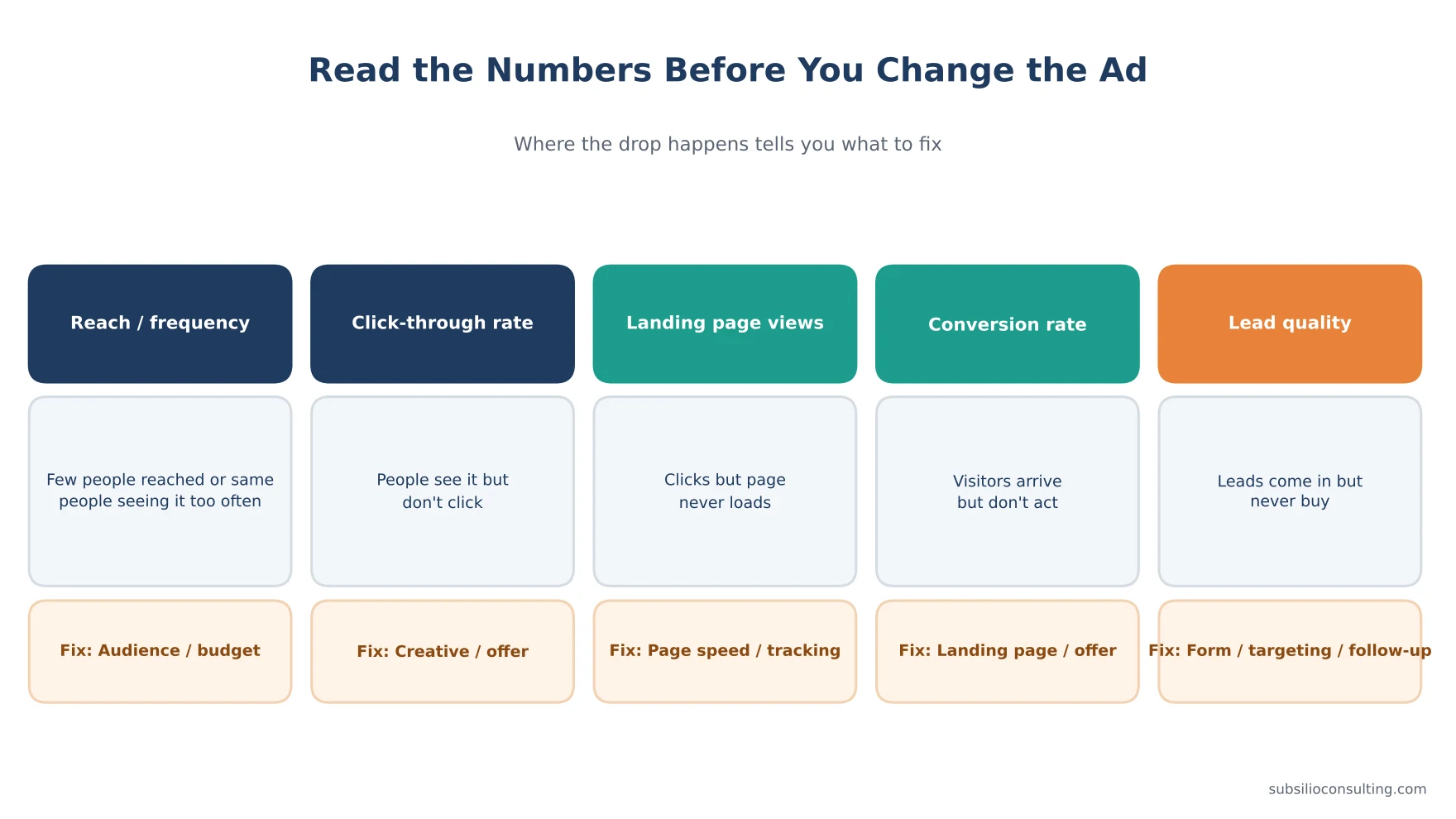
Where the drop happens tells you what to fix.
The fastest way to find the problem is to look at where people drop off:
| Where results drop | What it usually means | Where to look first |
|---|---|---|
| Low reach or not spending | Audience, budget or delivery issue | Problems 3, 4, 7 |
| Reach is fine, low click-through rate | Creative or offer isn’t appealing | Problem 5 |
| Clicks fine, few landing page views | Slow page or tracking issue | Problems 1, 6 |
| Page views fine, few conversions | Landing page or offer issue | Problem 6 |
| Plenty of leads, few customers | Lead quality, targeting or follow-up | Problems 2, 4 and your sales process |
Don’t Forget the Follow-Up
Sometimes the ads are working and the leads are going cold. Instant form leads in particular expect a quick reply.
- Respond to new leads as quickly as possible, ideally within minutes during business hours.
- Use automatic email or text confirmations.
- Track which leads become customers so you can judge campaigns on real results.
- Feed closed sales back to Meta through the Conversions API where possible.
When Facebook Ads Might Not Be the Right Channel (Yet)
Facebook and Instagram ads create demand. If people need to search for your service when a problem appears, such as emergency repairs, Google Search ads may be a better first channel. Our guide to Google Ads for local businesses explains how to get calls, not just clicks.
Facebook ads may also struggle if:
- Your average sale is too small to cover the cost of finding a customer.
- Your offer isn’t clear or competitive.
- You can’t follow up on leads quickly.
In those cases, fix the offer and process first, or invest in SEO and reviews for long-term visibility.
A Quick Facebook Ads Health Check
- ☐ Pixel and Conversions API set up and recording real events
- ☐ Objective matches the result you want
- ☐ Each ad set can get enough results to exit learning
- ☐ Audience is realistic, not over-stacked
- ☐ Three to five fresh ads per ad set, sized for all placements
- ☐ Landing page matches the ad and loads fast on mobile
- ☐ No rejections, restrictions or payment issues
- ☐ Leads followed up quickly and outcomes recorded
Conclusion: Diagnose Before You Decide
When Facebook ads aren’t working, the answer is rarely to give up, and rarely to just spend more. It’s to find the weak link. Check tracking first, then the objective, then learning, audience, creative, landing page and account health. Use the drop-off point in your numbers to know where to look.
Fix one thing at a time, give each change enough time to show results, and judge success by real leads and sales from your own records.
Want a second set of eyes on your campaigns? Subsilio Consulting reviews and manages Facebook and Instagram ads for small businesses in Denver and across the US. Contact us for a free ad audit and we’ll tell you exactly what’s holding your ads back.
Want Us to Diagnose Your Facebook Ads?
We review tracking, objectives, audiences, creative and landing pages to find out what is holding your campaigns back.
Frequently Asked Questions About Facebook Ads Not Working
Q1. Why are my Facebook ads getting clicks but no conversions?
Usually because of a landing page or offer issue, or broken conversion tracking. Check that your Pixel and Conversions API record conversions, that the page loads fast on mobile, and that it matches the ad’s offer.
Q2. Why are my Facebook ads not spending?
Common causes are a very narrow audience, a low bid or cost cap, ads still in review or rejected, payment problems, account spending limits, or a schedule that has ended. Check the delivery column and Account Quality.
Q3. What does “Learning limited” mean on Facebook ads?
It means Meta predicts the ad set won’t get enough optimisation events to exit the learning phase, which Meta describes as about 50 events in 7 days. Consolidate ad sets, broaden the audience, increase budget or optimise for a more frequent event.
Q4. How long should I wait before changing my Facebook ads?
Give a new campaign about a week before judging it, and avoid significant edits during the learning phase. Make changes in batches rather than daily.
Q5. Why did my Facebook ad results suddenly drop?
Common reasons include creative fatigue, a tracking break after a website change, increased competition (for example in Q4), a change in attribution settings, or a big edit that restarted learning.
Q6. Why are my Facebook leads low quality?
Instant forms make it very easy to submit, which can attract low-intent leads. Add a qualifying question, use a higher-intent form type, optimise for website leads, or tighten your offer and targeting.
Q7. Should I use broad targeting on Facebook ads?
Broad targeting often works well when your conversion tracking and creative are strong, because Meta’s system can find buyers more efficiently. With poor tracking, broad audiences can attract the wrong people.
Q8. Is it better to boost posts or use Ads Manager?
Ads Manager. It gives you full control over objectives, audiences, placements, creative testing and conversion tracking, which boosted posts don’t.