SOCIAL MEDIA ADVERTISING
Facebook and Instagram Ads for Small Businesses: A Beginner’s Guide
How to set up, target, budget and track your first Facebook and Instagram campaigns without wasting money.
ESTIMATED READ TIME: 12 MINUTES
Want help launching your first Facebook and Instagram campaigns?
Boosting a post feels like advertising. You pick a budget, tap a button, and a few hundred more people see it. But for most small businesses, boosted posts bring likes, not customers. The real power of Facebook and Instagram advertising sits a level deeper, in Meta Ads Manager, where you can choose your goal, decide exactly who sees your ads, test what works, and track the leads and sales you get back.
That can feel overwhelming the first time you open it. This guide makes it simple. We’ll walk through how Facebook and Instagram ads work, how to set up your accounts the right way, which campaign objective to choose, how to target the right people, how much to spend, what makes a good ad, and the mistakes beginners make most often.
It’s written from the experience of running social media advertising for small businesses at Subsilio Consulting, so it focuses on what actually moves the needle for local and small brands.
Key Takeaways
- Facebook and Instagram ads are run from one place, Meta Ads Manager, and can show on both apps (plus Messenger and Meta’s partner network).
- Every campaign is built in three levels: campaign (objective), ad set (budget, audience, placements) and ad (creative).
- Choose the objective that matches the result you want. For most small businesses that means Leads or Sales, not Engagement.
- Install the Meta Pixel and Conversions API before you spend, so Meta can learn from real results.
- Start simple: one campaign, one or two ad sets, three to five ads. Give it time before making changes.
- Facebook and Instagram ads create demand. Pair them with Google Search ads, which capture people already looking.
Why Facebook and Instagram Ads Work for Small Businesses
You Can Reach People Before They Search
Google Search ads reach people who already know what they want. Facebook and Instagram ads reach people while they scroll, often before they’ve started searching. That makes them great for new products, local services people don’t think about until reminded, events, offers and building awareness in your area.
Targeting Is Flexible
You can reach people by location, age, interests and behaviours, or let Meta’s automated targeting find people likely to respond. You can also show ads to people who already know you: website visitors, video viewers, Instagram engagers or your customer list.
Visual Formats Tell Your Story
Photos, short videos, carousels and Stories let you show your work, your team, your products and your customers in a way text ads can’t.
Budgets Are Flexible
You choose your daily or total budget and can start small while you test. For a detailed breakdown, see our guide to how much Facebook and Instagram ads cost.
Facebook Ads vs. Boosted Posts
| Boosted post | Ads Manager campaign | |
|---|---|---|
| Setup | A few taps from your Page or Instagram | More steps, more control |
| Goals | Limited | Full range of objectives (Leads, Sales, Traffic and more) |
| Targeting | Basic | Full audience options, custom and lookalike audiences |
| Creative testing | One post | Multiple ads and formats |
| Placements control | Limited | Full control |
| Tracking | Basic | Pixel and Conversions API events |
| Best for | Giving a good post extra reach | Getting leads, sales and measurable results |
Boosting is fine for a great post you want more people to see. For leads and sales, use Ads Manager.
Step 1: Set Up Your Accounts Properly
Getting the foundation right saves headaches later.
- Facebook Page. Complete your profile: category, address, hours, phone, website and a clear profile photo.
- Instagram professional account. Switch to a business or creator account and connect it to your Facebook Page.
- Business portfolio (Meta Business Suite / Business Manager). Create one in your business’s name. This is where your Page, Instagram, ad account and Pixel live.
- Ad account. Create it inside your business portfolio, with your payment method, currency and time zone. Time zone and currency are hard to change later.
- Add people with the right roles. Give your team or agency access through the business portfolio. Never hand over your personal login.
- Verify your domain. This confirms you own your website.
Important: your business should own all of these assets. If an agency creates them under its own portfolio, you can lose them if you part ways.
Step 2: Install Tracking Before You Spend
Install the Meta Pixel on your website and set up the Conversions API. Then set up events for the actions that matter: Lead, Contact, Schedule, Purchase.
Without tracking, Meta can only optimise for cheap clicks or engagement, which rarely become customers. Our guide to Google Ads and Facebook Ads conversion tracking explains the full setup.
Step 3: Understand How a Campaign Is Built
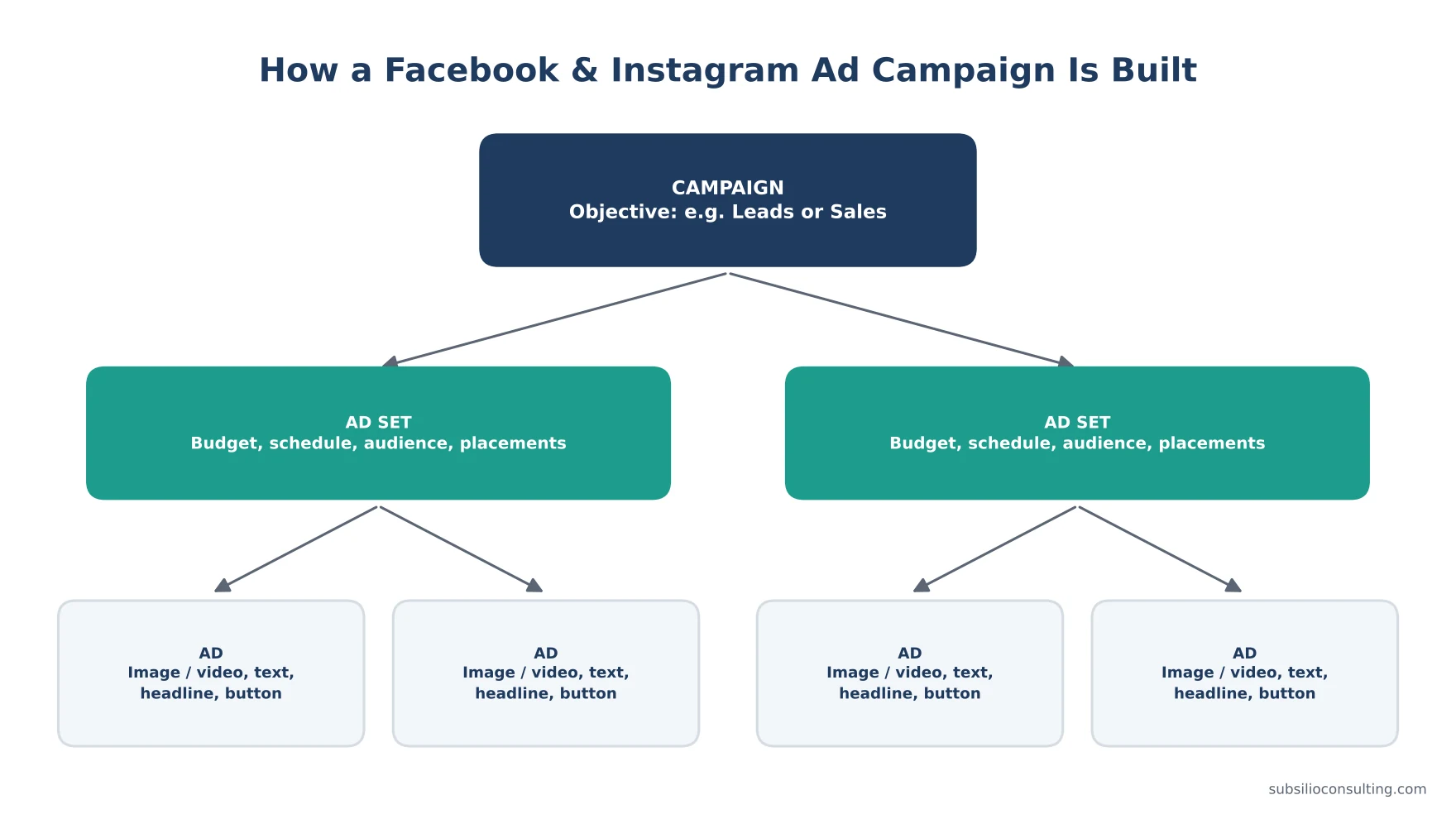
Every Meta campaign has three levels: campaign, ad set and ad.
| Level | What you choose |
|---|---|
| Campaign | Your objective (what you want people to do) and, optionally, a campaign budget |
| Ad set | Budget and schedule, audience, placements (where ads appear), optimisation goal |
| Ad | The creative: image or video, primary text, headline, call-to-action button, destination |
Step 4: Choose the Right Objective
Meta Ads Manager offers six objectives:
| Objective | What Meta optimises for | Good for |
|---|---|---|
| Awareness | Showing ads to as many relevant people as possible, or to people likely to remember them | New businesses, launches, local awareness |
| Traffic | Clicks to your website, app or messages | Content, blog posts, warming up audiences |
| Engagement | Likes, comments, shares, video views, messages | Growing video audiences, community, events |
| Leads | Form submissions, calls, messages, website leads | Service businesses, quotes, bookings |
| App promotion | App installs and in-app actions | Businesses with an app |
| Sales | Purchases and other conversions on your website | Ecommerce, online bookings, high-value conversions |
Beginner rule: choose the objective that matches the result you’d pay for. If you want leads, choose Leads. If you want sales, choose Sales. Engagement is cheap, but cheap likes don’t pay the bills.
Instant Forms vs. Website Leads
With the Leads objective, you can collect leads two ways:
- Instant forms: a form opens inside Facebook or Instagram, pre-filled with the person’s details. Easy for people to complete, but leads can be lower quality. Add a qualifying question or use the “higher intent” option to help.
- Website leads: send people to your website form. Often higher quality, but needs a good landing page and tracking.
Test both and compare cost per qualified lead, not just cost per lead.
Step 5: Choose Your Audience
Location
For local businesses, start with your real service area. Be careful about who you include: people living in the area vs. people recently in the area.
Broad or Automated Targeting
Meta’s delivery system is increasingly good at finding the right people within a broad audience, as long as your tracking and creative are strong. Many advertisers now start fairly broad, with location and age limits, and let the system learn.
Detailed Targeting (Interests and Behaviours)
You can add interests (for example, home improvement, fitness, pets) as signals. Avoid making audiences too narrow, as this can push costs up and slow learning.
Custom Audiences (Your Warmest People)
- Website visitors (needs the Pixel)
- People who watched your videos
- People who engaged with your Facebook Page or Instagram
- Your customer list (uploaded securely, and only if you have permission to use it)
These are ideal for retargeting.
Lookalike Audiences
Meta finds people similar to your customers or website visitors. Useful once you have a decent-sized source audience.
Special Ad Categories
If you advertise housing, employment, or financial products and services (including credit and insurance), you must declare a Special Ad Category. These campaigns have restricted targeting options, such as limits on age, gender and location targeting, to prevent discrimination. Social issue, election and political ads have their own authorisation rules.
Step 6: Choose Placements
Placements are where your ads appear: Facebook Feed, Instagram Feed, Stories, Reels, Messenger, Marketplace, search results and Meta’s partner network of apps.
For beginners, Advantage+ placements (automatic placements) usually works well, because Meta can show your ad where it performs best for the lowest cost. Just make sure your creative fits different shapes:
- Square (1:1) or vertical (4:5) for feeds
- Full vertical (9:16) for Stories and Reels
Step 7: Set Your Budget
Daily vs. Lifetime Budget
- Daily budget: an average amount per day. Good for ongoing campaigns.
- Lifetime budget: a total for a set period. Good for promotions with a clear end date.
How Much to Start With
There’s no minimum that guarantees results. A useful rule: your budget should be able to generate enough results each week for Meta to learn. Meta says an ad set generally needs about 50 optimisation events in the 7 days after a significant edit to exit the learning phase. If your budget can’t get close to that for purchases, consider optimising for a more frequent event (such as leads) or combining ad sets.
Read our full guide to Facebook and Instagram ad costs for budget examples.
Step 8: Create Ads That Stop the Scroll
What Works for Small Businesses
- Real photos and videos of your team, your work and your customers usually beat polished stock images.
- Short vertical video that gets to the point in the first few seconds.
- Before-and-after shots for trades, beauty, cleaning and design.
- Customer reviews and testimonials (with permission).
- A clear offer and a clear next step.
- Local cues, such as neighbourhoods or landmarks, so people know you’re nearby.
Writing the Text
- Hook in the first line. Call out the audience or the problem: “Denver homeowners: is your furnace ready for winter?”
- Say what you offer and why it’s different.
- Add proof. Reviews, years in business, guarantees.
- One call to action. “Book your tune-up,” “Get a free quote.”
Test Several Ads
Run three to five different ads in each ad set: different images or videos, hooks and offers. Let Meta show the best performers more often.
Follow Meta’s Advertising Standards
Avoid sensational claims, before-and-after images that break health rules, personal attribute language (“Are you overweight?”), and misleading offers. Ad rejections slow you down and can restrict your account.
Step 9: Build a Simple Funnel
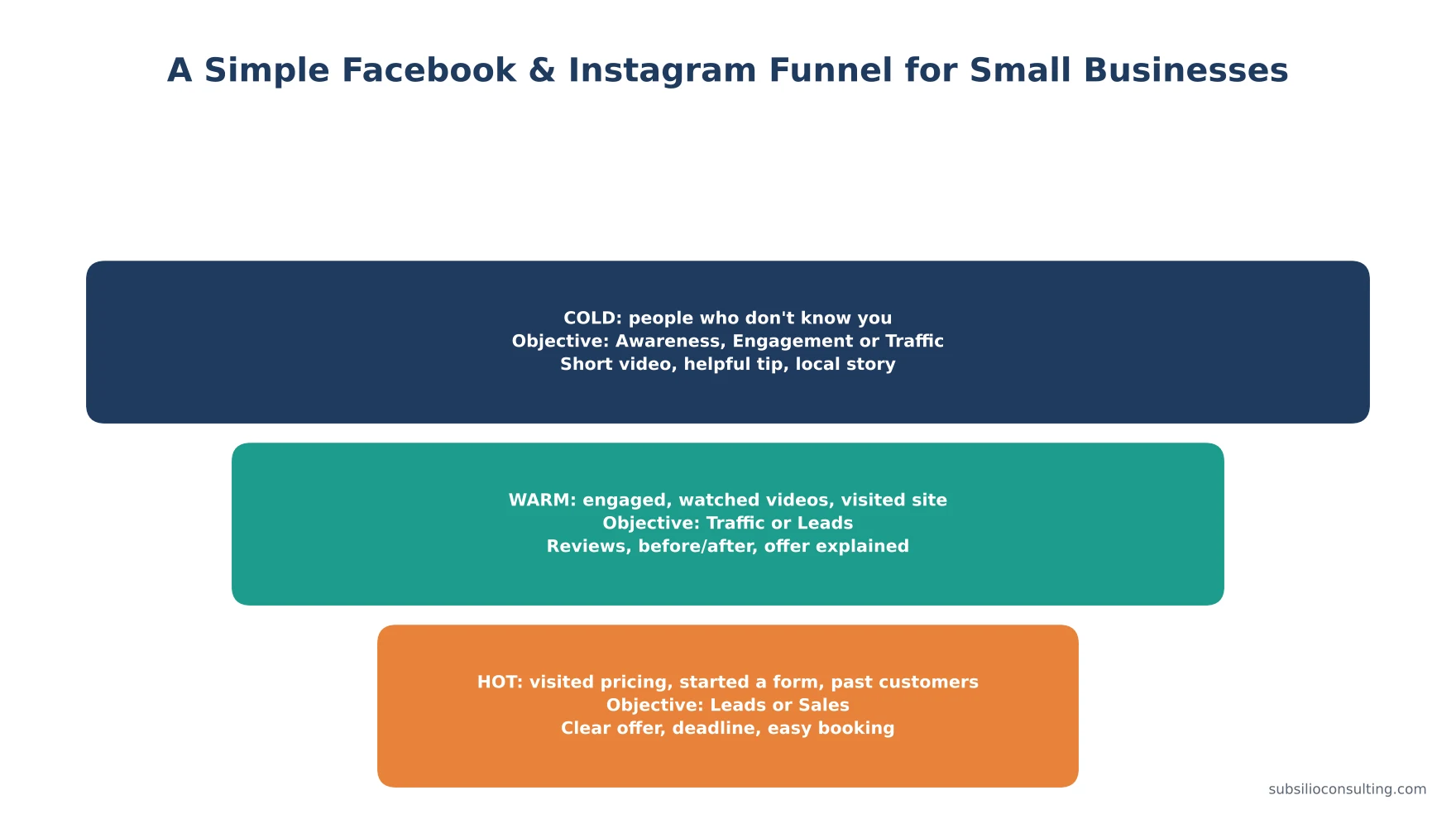
Move people from cold to warm to hot audiences with a different message at each stage.
Most people won’t buy from the first ad they see. A simple funnel helps:
- Cold audiences (don’t know you): helpful videos, local stories, introductory offers.
- Warm audiences (engaged or visited): reviews, explainers, offer details.
- Hot audiences (visited pricing, started a form, past customers): clear offer, urgency, easy booking.
You can start with a single Leads or Sales campaign and add retargeting once you have traffic.
Step 10: Launch, Then Be Patient
After launch, Meta’s delivery system enters a learning phase. Results can be uneven at first. Avoid frequent edits during this time. Significant changes to budget, audience, creative or optimisation event can restart learning.
A sensible review rhythm for beginners:
- Daily (first week): check ads are delivering and not rejected.
- After 7 days: look at cost per result, click-through rate and landing page views.
- After 2–4 weeks: pause weak ads, add new creative, adjust budget towards what works.
Which Metrics Should You Watch?
| Metric | What it tells you |
|---|---|
| Cost per result (lead, purchase) | The main measure of efficiency |
| Results | How many leads or sales you got |
| Click-through rate (link) | Whether your ad is interesting enough to click |
| Cost per 1,000 impressions (CPM) | How expensive it is to reach your audience |
| Frequency | How many times the average person saw your ad |
| Landing page views | Whether clicks actually load your page |
| Lead quality | Whether leads turn into customers (from your own records) |
If ads aren’t performing, our guide to why Facebook ads aren’t working covers the seven most common problems and fixes.
Common Beginner Mistakes
- Choosing Engagement when you want customers.
- Making the audience too narrow.
- Running one ad and judging the whole channel on it.
- Editing campaigns every day.
- No Pixel or Conversions API.
- Sending traffic to a slow or confusing page.
- Not following up on leads quickly. Instant form leads go cold fast.
- Ignoring comments on ads. Reply to questions, and handle negative comments professionally.
- Letting someone else own your ad account.
How Facebook and Instagram Ads Fit With Your Other Marketing
Facebook and Instagram ads work best as part of a bigger plan:
- Google Search ads capture people actively searching. Facebook and Instagram create the demand that later turns into searches.
- Organic social media builds trust and gives your ads social proof.
- Reviews and reputation make every ad more convincing.
- Your website is where many conversions happen. A fast, clear site makes ads cheaper.
- Retargeting and email turn interest into sales over time.
For B2B companies, LinkedIn may be a better fit for some audiences. See our guide to LinkedIn Ads for B2B.
Conclusion: Start Simple, Track Everything, Improve Monthly
Facebook and Instagram ads can bring small businesses a steady flow of customers, but only when the basics are right. Own your accounts. Install tracking. Choose the objective that matches the result you want. Start broad enough for Meta to learn. Use real, scroll-stopping creative. And give each campaign enough time and budget before judging it.
Once you have that foundation, you can add retargeting, test new offers and scale what works.
Need a hand getting started? Subsilio Consulting sets up and manages Facebook and Instagram ads for small businesses in Denver and across the US, as part of our digital ads and social media services. Book a free consultation and we’ll help you build your first campaign the right way.
Ready to Run Facebook and Instagram Ads That Bring Leads?
We set up, track and manage Facebook and Instagram campaigns for small businesses, with reporting built around leads and sales.
Frequently Asked Questions About Facebook and Instagram Ads
Q1. Are Facebook ads worth it for small businesses?
Yes, for many small businesses, especially local services, ecommerce, restaurants, fitness, beauty and events. They work best with proper tracking, the right objective, strong creative and quick lead follow-up.
Q2. Can I run Facebook and Instagram ads from one place?
Yes. Meta Ads Manager lets you create one campaign that shows on Facebook, Instagram, Messenger and Meta’s partner network. You can let Meta choose placements automatically or select them yourself.
Q3. How much should a beginner spend on Facebook ads?
Start with a budget you can afford to test for at least a few weeks. Ideally it should generate enough results for Meta to learn, which Meta describes as about 50 optimisation events in a week per ad set. If that isn’t realistic, optimise for a more frequent action or combine ad sets.
Q4. What is the best objective for Facebook ads?
The best objective is the one that matches the result you want. For most small businesses that’s Leads or Sales. Use Awareness, Traffic or Engagement for specific goals like building video audiences or promoting content.
Q5. Do I need a website to run Facebook ads?
No. You can use instant forms, messages or calls with the Leads objective. But a website with the Meta Pixel and Conversions API gives you more options, better tracking and retargeting audiences.
Q6. What is the Meta Pixel?
The Meta Pixel is code on your website that records actions people take after seeing or clicking your ads, such as viewing a page, submitting a form or buying. Meta uses it to measure results and find more people likely to take the same action.
Q7. How long does it take for Facebook ads to work?
Ads can start delivering within a day of approval. Most campaigns need one to two weeks to get through the learning phase, and several weeks of testing to find the best audiences and creative.
Q8. Should I boost posts or use Ads Manager?
Boost posts when you simply want more people to see a great post. Use Ads Manager when you want leads or sales, need better targeting, want to test multiple ads, or need proper conversion tracking.