
GOOGLE ADS
How Much Do Google Ads Cost for Small Businesses in Denver?
How Google Ads pricing works, what drives cost per click in the Denver metro, and how to set a budget from your own numbers.
ESTIMATED READ TIME: 12 MINUTES
Want help setting a Google Ads budget that fits your numbers?
“How much should I spend on Google Ads?” is the question we hear most from Denver business owners. The honest answer is: Google Ads costs exactly what you decide to spend, but what you need to spend depends on your industry, your competition across the Denver metro, and how well your ads and website turn clicks into customers.
That answer is frustrating if you are trying to plan a budget. So this guide goes further. We’ll explain how Google Ads pricing actually works, what pushes cost per click up or down in Denver, how to calculate a starting budget from your own numbers, what management costs on top of ad spend, and how to stop money leaking out of your account.
We manage Google Ads and other digital ads for small businesses from our office on Colorado Boulevard in Denver, so the examples here come from the questions local owners actually ask us.
Key Takeaways
- There is no minimum spend on Google Ads. You set an average daily budget, and Google will not charge more than 30.4 times that amount in a month for most campaigns.
- You usually pay per click, and the price of each click is set in a live auction influenced by your bid, ad quality, competition and the search itself.
- The right budget starts from your target number of leads and your cost per lead, not from a round number.
- Total cost = ad spend + management (agency or your time) + landing page and tracking setup.
- Wasted spend usually comes from poor targeting, missing negative keywords, weak landing pages and broken conversion tracking.
The Short Answer
There is no fixed price for Google Ads. You set the budget. Google then runs an auction each time someone searches, and you pay when someone clicks your ad (for most Search campaigns).
What you need to spend to get meaningful results depends on:
- How much a click costs for your services in Denver.
- How many of those clicks become calls or form submissions.
- How many leads you need each month to hit your sales goals.
A plumber, a personal injury lawyer and a yoga studio in Denver will have very different click costs, because the value of a customer and the number of competitors are very different. That is why any article quoting a single “average cost” for Google Ads is of limited use to you. The method below will give you a number based on your business.
How Google Ads Pricing Works
You Set a Budget, Google Runs an Auction
Each time someone searches on Google, an auction decides which ads appear and in what order. Google calls the score that decides this Ad Rank. It is based on your bid, the quality of your ads and landing page, Ad Rank thresholds, the competitiveness of the auction, the context of the search (like location and device), and the expected impact of your ad assets.
Two important points come from this:
- The highest bidder does not always win. Better ads and landing pages can win higher positions at lower cost.
- You often pay less than your maximum bid. Your bid is the most you are willing to pay for a click, not what you always pay.
How Daily Budgets Really Work
This catches many new advertisers out. In Google Ads you set an average daily budget per campaign. According to Google’s help page about spending limits, for most campaigns:
- On any single day you can be charged up to 2 times your average daily budget.
- Over a month you won’t be charged more than 30.4 times your average daily budget (30.4 is the average number of days in a month).
So a $50 daily budget can spend up to $100 on a busy day, but should not go over $1,520 for the month. Google explains this in more detail in its article on overdelivery and your average daily budget. If you change your budget mid-month, the monthly limit is recalculated.
What You Pay For
| Campaign type | Usually pay for | Best for |
|---|---|---|
| Search | Clicks | People actively searching for your service |
| Performance Max | Clicks, impressions or conversions depending on setup | Reaching people across Google’s channels |
| Display | Clicks or impressions | Awareness and retargeting |
| Video (YouTube) | Views or impressions | Awareness and education |
| Local Services Ads | Leads (calls, messages, bookings) | Eligible home and local service businesses |
For most Denver service businesses starting out, a well-built Search campaign is the right first step because it reaches people who are already looking.
What Drives Your Cost Per Click in Denver
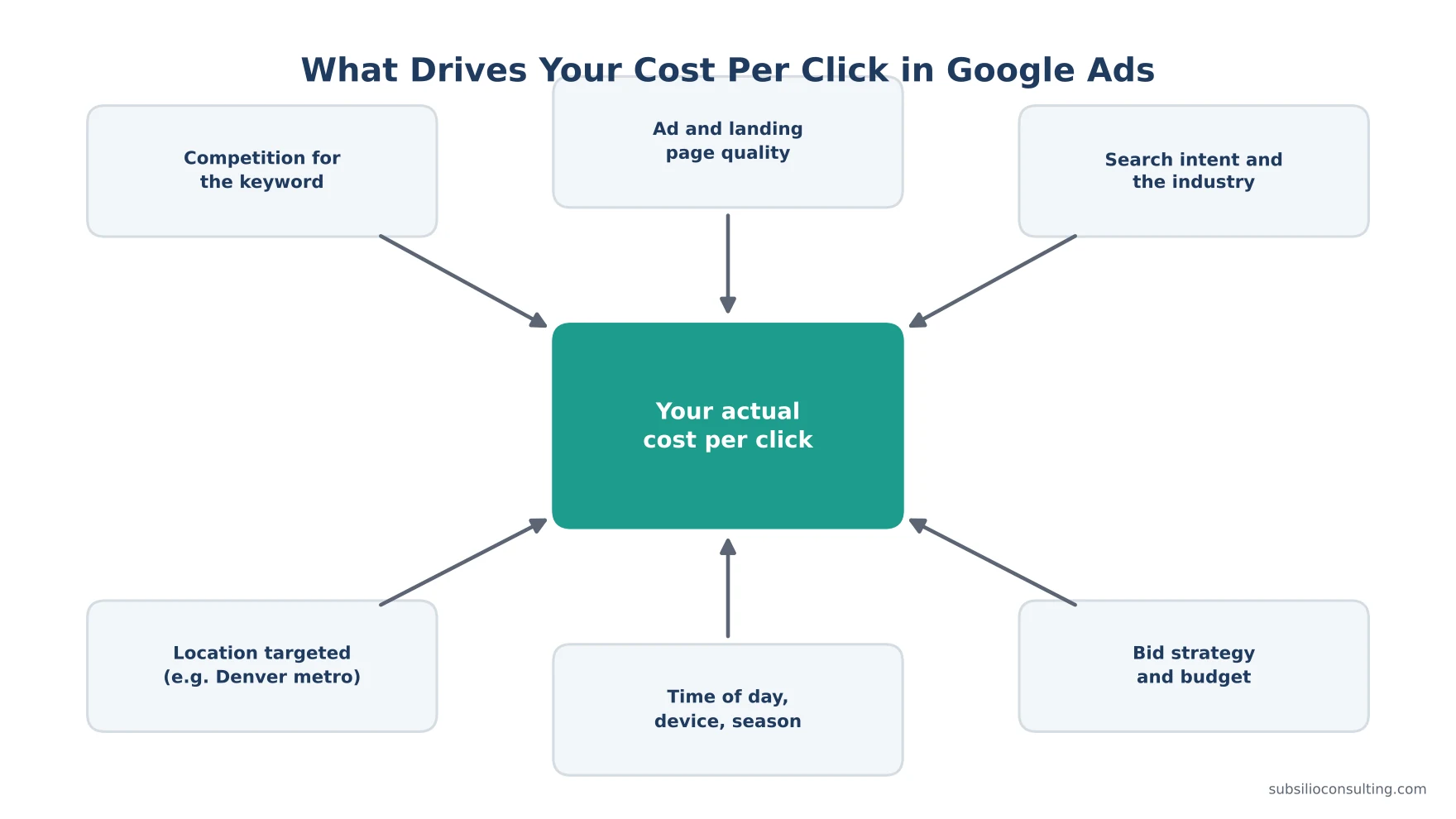
Several factors combine to set what you actually pay for each click.
1. Your Industry and the Value of a Customer
Industries where a single customer is worth a lot, such as legal, home services, medical and financial services, tend to have more competitive auctions. Businesses with high-value jobs can afford to pay more per click, which pushes prices up for everyone in that category.
2. Competition in the Denver Metro
The number of businesses bidding on the same keywords matters. Denver is a growing, competitive metro, and many services are also offered by regional and national companies. Targeting the whole metro (Denver, Aurora, Lakewood, Arvada, Westminster, Thornton, Centennial and beyond) means competing with more advertisers than targeting a tight service area.
3. Your Ad Quality and Landing Page
Google rewards relevant ads and useful landing pages. Its Quality Score diagnostic summarises three things: expected clickthrough rate, ad relevance and landing page experience. Improving these is one of the few ways to pay less for the same position. We cover this in our guide on how to improve Quality Score and lower cost per click.
4. Search Intent
“Emergency furnace repair Denver” is a high-intent search. “How does a furnace work” is not. High-intent keywords cost more but convert better. Low-intent keywords look cheap but rarely produce customers.
5. Timing and Seasonality
Click costs rise when demand rises. In Colorado that might mean furnace and heating searches in the first cold snaps of fall, AC searches during summer heat, auto glass and body work after hail storms, or retail and gifting searches in November and December. Your budget should flex with your season.
6. Device, Location and Bid Strategy
Mobile searches for local services often lead straight to calls. Targeting radius, location settings, ad schedule and your bid strategy (for example Maximize Conversions vs. Target CPA) all change what you pay and who you reach.
How to Estimate Your Own Google Ads Budget
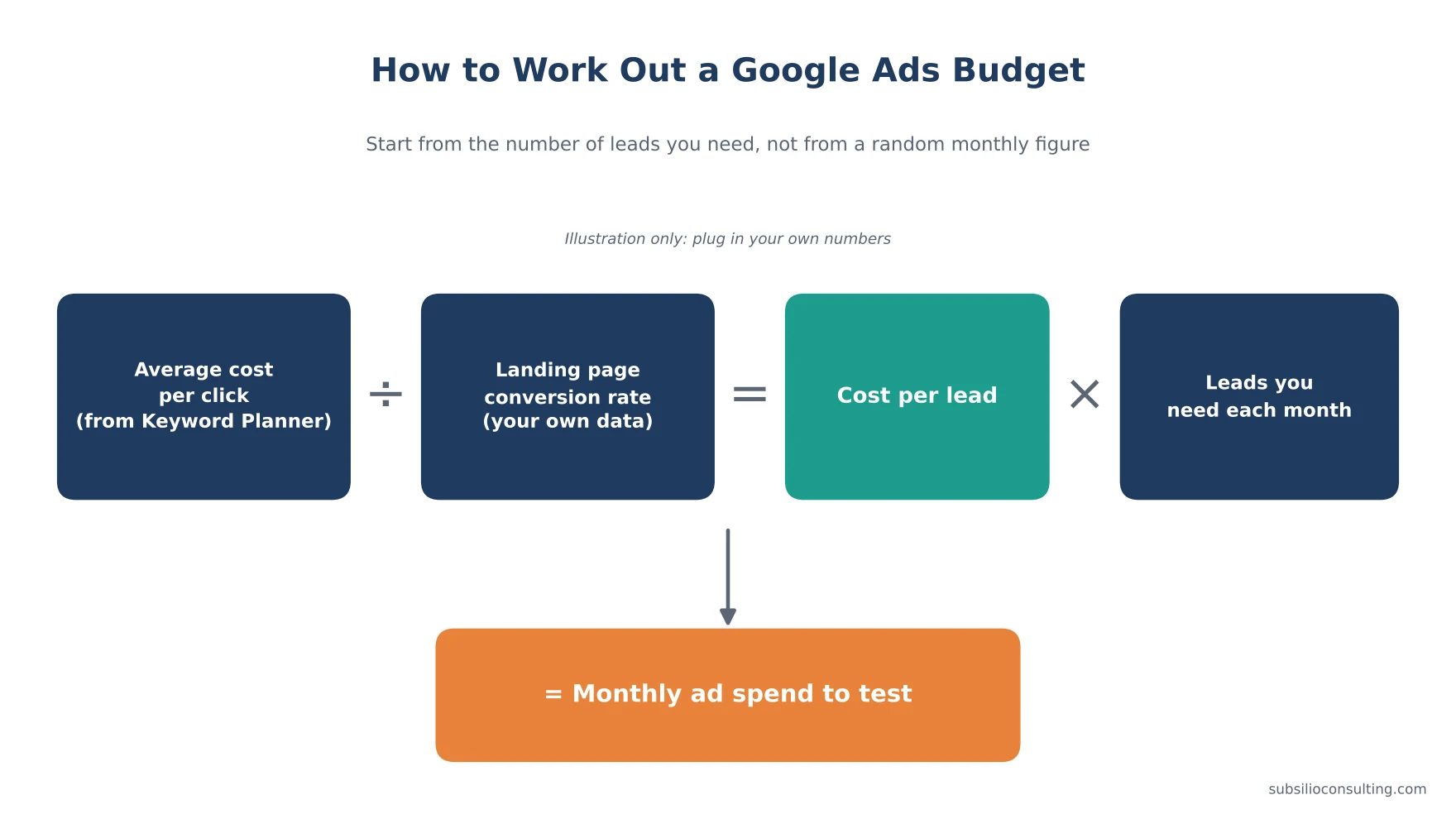
Work out your budget from the leads you need, not from a random monthly figure.
Instead of picking a round number, work backwards from your goals.
Step 1: Find Real Click Costs for Your Keywords
Use Google’s free Keyword Planner inside a Google Ads account. Enter your main services, set the location to your Denver service area, and look at the “Top of page bid (low range)” and “Top of page bid (high range)” columns. These are Google’s estimates based on past auctions for that location. Forecasts for small areas can be less accurate, so treat them as a guide, not a quote.
Step 2: Estimate Your Conversion Rate
What share of website visitors from ads will call or submit a form? If you have history, use your own data. If you don’t, start with a cautious estimate and update it after your first month of real results.
Step 3: Calculate Cost Per Lead
Cost per click ÷ conversion rate = cost per lead
Step 4: Decide How Many Leads You Need
How many new customers do you want each month? How many leads does your team usually need to win one? Multiply to get leads needed.
Step 5: Calculate Monthly Spend
Cost per lead × leads needed = monthly ad spend
Worked Example (Illustration Only)
These numbers are made up to show the maths. Use your own Keyword Planner data and results.
| Input | Example value |
|---|---|
| Average cost per click | $8 |
| Landing page conversion rate | 8% |
| Cost per lead | $8 ÷ 0.08 = $100 |
| Close rate (leads to customers) | 1 in 4 |
| Cost per new customer | $400 |
| New customers wanted per month | 10 |
| Leads needed | 40 |
| Monthly ad spend | 40 × $100 = $4,000 |
| Average daily budget | $4,000 ÷ 30.4 ≈ $132 |
Now check this against what a customer is worth. If an average job is worth $1,500 in profit, spending $400 to win it is healthy. If an average job is worth $250, this plan loses money, and you need either a better conversion rate, a tighter target area, higher-value services, or a different channel.
Step 6: Make Sure the Budget Can Learn
If your budget only buys a handful of clicks a day, it can take months to know what works, and automated bidding has little data to learn from. In that case it is usually better to focus the whole budget on your one or two most profitable services, in a tighter area, than to spread it thin across everything.
The Full Cost of Running Google Ads
Ad spend is only part of the picture.
Ad Spend
Paid directly to Google. You control it.
Management
Either an agency or freelancer fee, or your own time. Common models are a flat monthly fee, a percentage of ad spend, or a hybrid. We break these down, with what you should get for each, in our guide to PPC management pricing. Whoever manages your account, Google expects third-party managers to be transparent about costs and fees under its third-party policy.
Landing Pages and Website
Sending paid clicks to a slow, generic homepage is one of the most expensive mistakes in PPC. A focused landing page for each main service usually pays for itself. If your site needs work, our web design team builds pages designed to convert.
Tracking
Call tracking, form tracking and importing closed sales cost time to set up, but without them you are guessing. See our guide to Google Ads and Facebook Ads conversion tracking.
Creative
Search ads need strong copy. Display, YouTube and Performance Max also need images and video.
Google Ads vs. Local Services Ads for Denver Businesses
If you are a home service, legal or certain other local business, you may also be eligible for Google Local Services Ads, which charge per lead rather than per click and show at the top of some local searches. Eligibility depends on your category and location. In 2026 Google began moving Local Services Ads into the main Google Ads platform as a pay-per-lead campaign type, so management is changing for many advertisers. Many local businesses run both: Local Services Ads for lead volume in their core category, and Search campaigns for wider control over keywords, ads and landing pages.
How to Lower Your Google Ads Cost Without Losing Leads
- Target a realistic service area. Don’t pay for clicks from places you can’t serve.
- Use location options carefully. Make sure you’re targeting people in or regularly in your area, not just people interested in it, unless that’s intentional.
- Add negative keywords weekly at first. Use the search terms report to block jobs, DIY, free and unrelated searches.
- Group keywords tightly. One service per ad group, with ads written for that service.
- Send clicks to matching pages. A brake repair ad should go to a brake repair page.
- Add call, location, sitelink and callout assets. They make ads more useful and count in Ad Rank.
- Schedule ads for when you can answer the phone, if calls are your main lead source.
- Track real conversions only, so smart bidding optimises for leads, not page views.
- Review monthly against your own numbers, not against generic benchmarks.
If you’re already spending and not getting leads, start with our Google Ads audit checklist.
How Long Before You See Results?
Ads can start showing within hours of approval, and many businesses see their first calls in the first week. But reaching stable, efficient performance usually takes longer, because you need enough data to know which keywords, ads and times produce customers. Plan to review closely in the first month and make bigger decisions after you have a few weeks of real conversion data.
Is Google Ads Worth It for Denver Small Businesses?
Google Ads is usually worth it when:
- People actively search for what you sell.
- Your average customer value comfortably covers your cost per customer.
- You can answer calls and follow up on leads quickly.
- Your website or landing page is clear and fast.
It’s harder to make work when customer value is low, when searches are rare, or when leads aren’t followed up. In those cases, SEO, your Google Business Profile, reviews and reputation or social media may give better returns first. Our guide to Google Ads for local businesses explains how to get calls, not just clicks.
Conclusion: Budget From Your Numbers, Not From a Guess
Google Ads can be one of the fastest ways for a Denver small business to get calls from people ready to buy. But the cost isn’t a fixed price tag. It’s the result of your keywords, your competition, your ad quality, your landing pages and your tracking.
Start with the formula: cost per click ÷ conversion rate = cost per lead, then multiply by the leads you need. Check that against what a customer is worth. Then protect that budget with tight targeting, negative keywords and real conversion tracking.
If you want a budget built from real Denver keyword data, Subsilio Consulting can help. We offer a free ad audit and consultation. Contact our team and we’ll show you what Google Ads should cost for your business.
Ready to Budget Google Ads From Real Numbers?
We build Google Ads budgets around the leads you need and what a customer is worth, then track every dollar back to calls and bookings.
Frequently Asked Questions About Google Ads Costs in Denver
Q1. How much does Google Ads cost per month for a small business in Denver?
There is no fixed monthly cost. You set the budget. To find the right amount, multiply your expected cost per lead by the number of leads you need. Your cost per lead depends on the cost per click for your keywords in Denver and your website’s conversion rate.
Q2. Is there a minimum budget for Google Ads?
No. Google Ads has no minimum spend. However, very small budgets may not buy enough clicks to learn what works, so it’s best to focus a small budget on your most profitable service and a tight service area.
Q3. Why did Google spend more than my daily budget?
Google can spend up to twice your average daily budget on a single day when traffic is higher. For most campaigns, it won’t charge more than 30.4 times your average daily budget in a month, and it credits you if overdelivery goes past that limit.
Q4. How much does a click cost on Google Ads in Denver?
It varies by keyword. Use Google Keyword Planner with your Denver service area to see the estimated top-of-page bid range for your keywords. Competitive, high-value services cost more per click than low-competition ones.
Q5. What is a good cost per lead on Google Ads?
A good cost per lead is one that keeps your cost per new customer below the profit you make from that customer. Work it out from your average job value and close rate rather than relying on industry averages.
Q6. How much do agencies charge to manage Google Ads?
Agencies typically charge a flat monthly fee, a percentage of ad spend, or a mix of both. The fee should be shown separately from your ad spend, and you should own the ad account.
Q7. Can I lower my Google Ads costs?
Yes. The most reliable ways are improving ad relevance and landing pages, adding negative keywords, tightening your service area, scheduling ads for business hours, and tracking only real conversions so automated bidding optimises for leads.
Q8. Are Local Services Ads cheaper than Google Search Ads?
Local Services Ads charge per lead rather than per click, which some businesses prefer. Whether they are cheaper depends on your category, competition and lead quality. Many businesses test both and compare cost per booked job.